
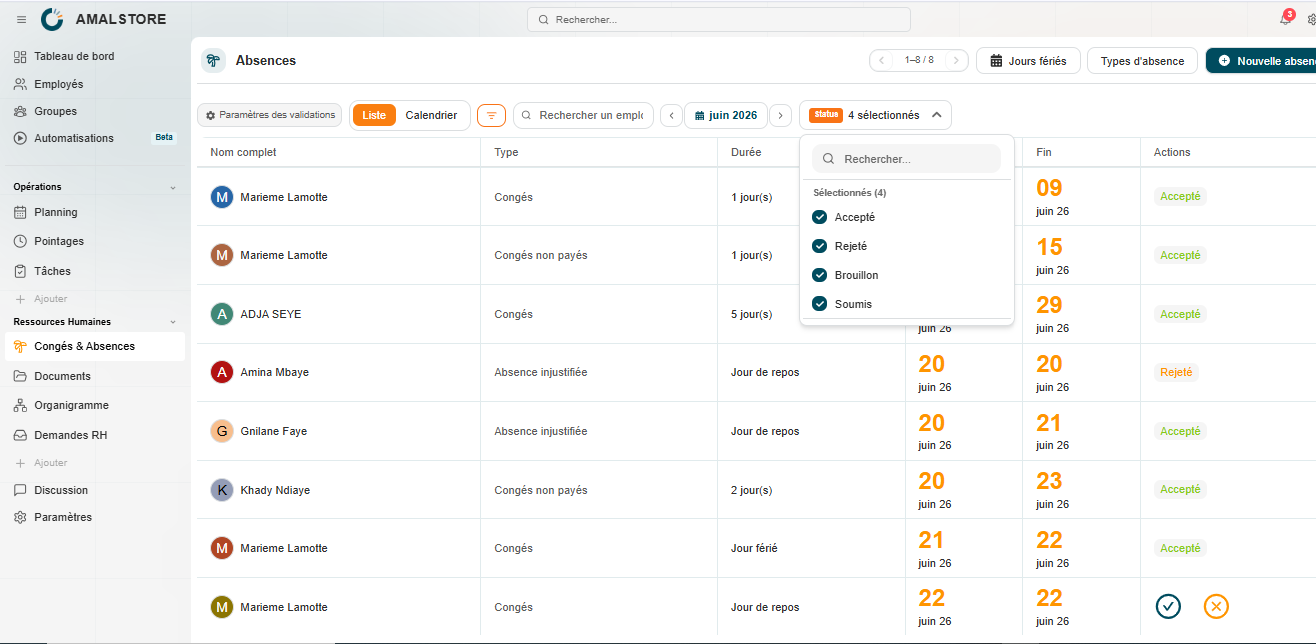
Once created, each request appears in the list of absences along with its status. There are two display modes available for viewing these requests: the List view and the Calendar view.
The List view
The List view displays requests in a table format, showing the following information: the employee’s full name, the type of absence, the duration, and the start and end dates. When a request is awaiting approval, two actions are available directly in the Actions column:
• A green tick: to approve the request.
• An orange cross: to reject the request.
Once the request has been processed, its status is displayed directly in the Actions column, for example ‘Approved’, without the need to return to the request.
The calendar view
The Calendar view provides a visual representation of absences on a grid of days, with a dedicated row for each employee. Approved periods of absence appear as coloured bars indicating the type of absence, providing a quick overview of team availability over a given period.
Filtering and searching for a request
The Filters button allows you to refine the display of requests according to several additional criteria: employee filters let you filter by employee group, whilst schedule filters allow you to refine the search by site or role.
The dedicated search bar also allows for a quick search by employee name. The Status filter, located at the top right, allows you to display only certain request statuses (pending, accepted, rejected, etc.). Finally, the arrows flanking the displayed month allow you to navigate easily between different periods.