Patrols, cleaning rounds, room checks, weighings: the person on duty gets the checklist on time, from the schedule. You see what is done, what is not, and who is fixing the problems.
Every round keeps the time, the person and the photo
1 PDF
The month’s report, site by site, ready for the client
They run their teams on Weplanify
Clinics, security firms, construction companies, professional practices and distributors.
In Weplanify
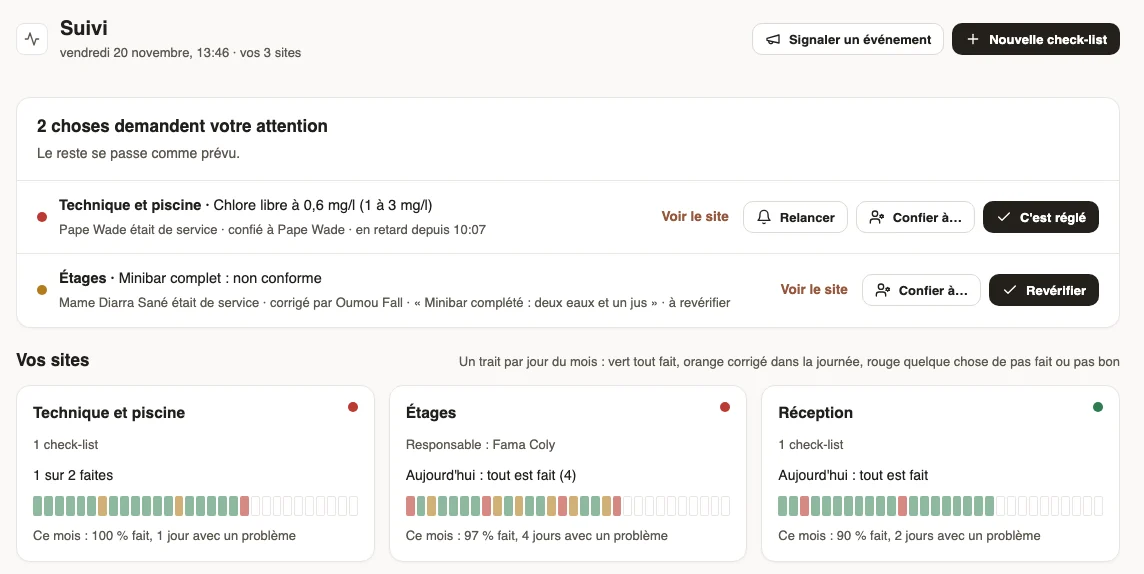
A hotel’s follow-up at 1:46 pm: at the top, only what needs action; below, one card per place with the month in colours.
The module in one line
The agent does it, the manager follows, the client sees the proof
On the agent’s phone
The checklist reaches the person on duty on time, from the schedule. They answer point by point: right or not right, a reading, a photo. A replacement gets it instead.
In the manager’s follow-up
At the top, only what needs action: not done, not right, an incident. One sentence and one button: give it to someone, remind, settled. Below, one card per site with the month in colours.
For the client or the auditor
The register gives every reading with the time and the person. The month’s report says what was done, what was wrong and how it was settled.
One day per trade
What it changes, on real screens
Four companies, one month of November played end to end in Weplanify: agents answer on their phones, managers follow and settle on the web.
To start
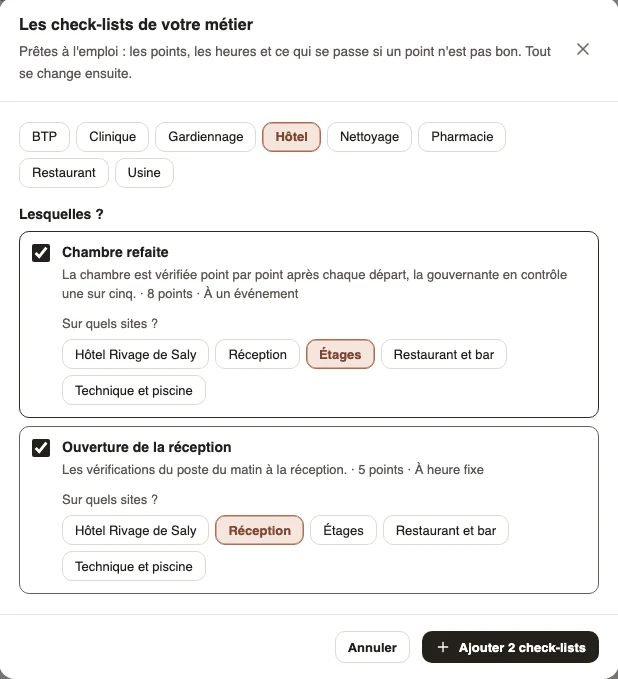
Your trade’s checklists, in one go
You choose your trade: hotel, cleaning, security, factory, clinic, restaurant, pharmacy, construction.
You tick the ready-made checklists and, for each one, the sites it applies to.
Points, times and what happens when something is wrong are already set. Everything can be changed later, and you can write your own on a single page.
Room done on the Floors, opening at Reception: two checklists, one click.
Hotel
A room badly done, fixed before the guest arrives
Reception releases room 214. The housekeeper on duty checks it: “Minibar full: not right, two bottles of water missing”.
The problem goes up to the follow-up. The director gives it to a colleague, who fills the minibar and says so on her phone.
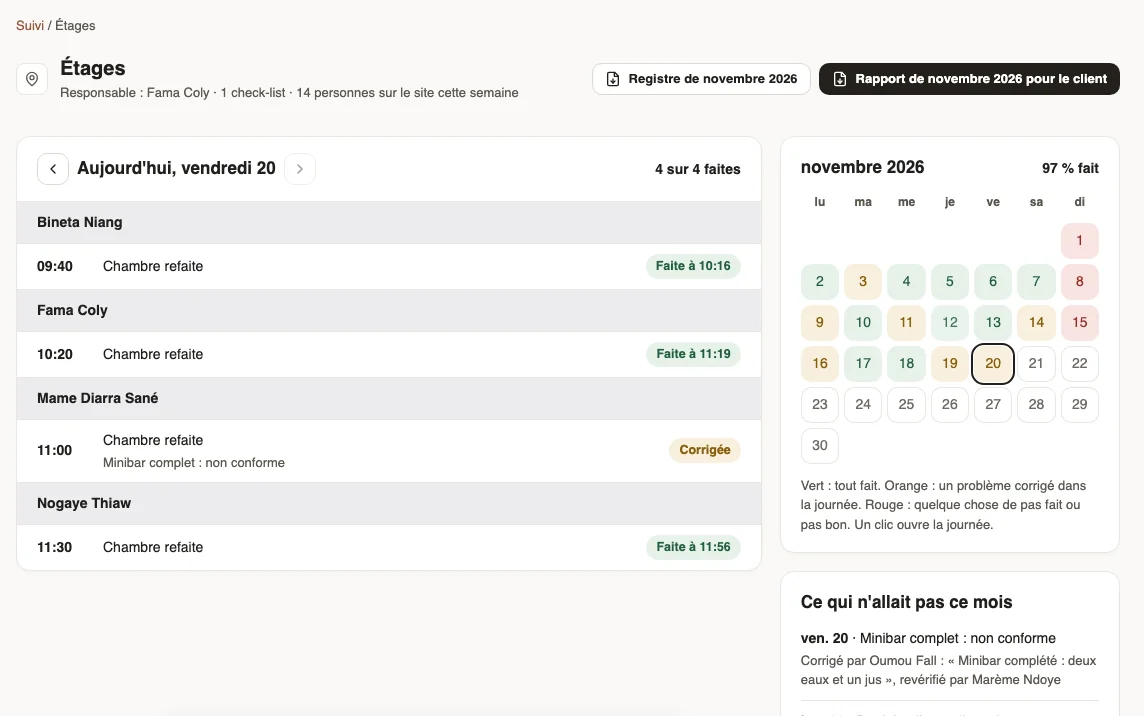
The director checks again. On the Floors page, the day is sorted by person, and the month keeps who fixed it and who checked it.
Every room, who did it and when; in orange, the days a problem was fixed.
Cleaning
The missed round, caught up within the hour
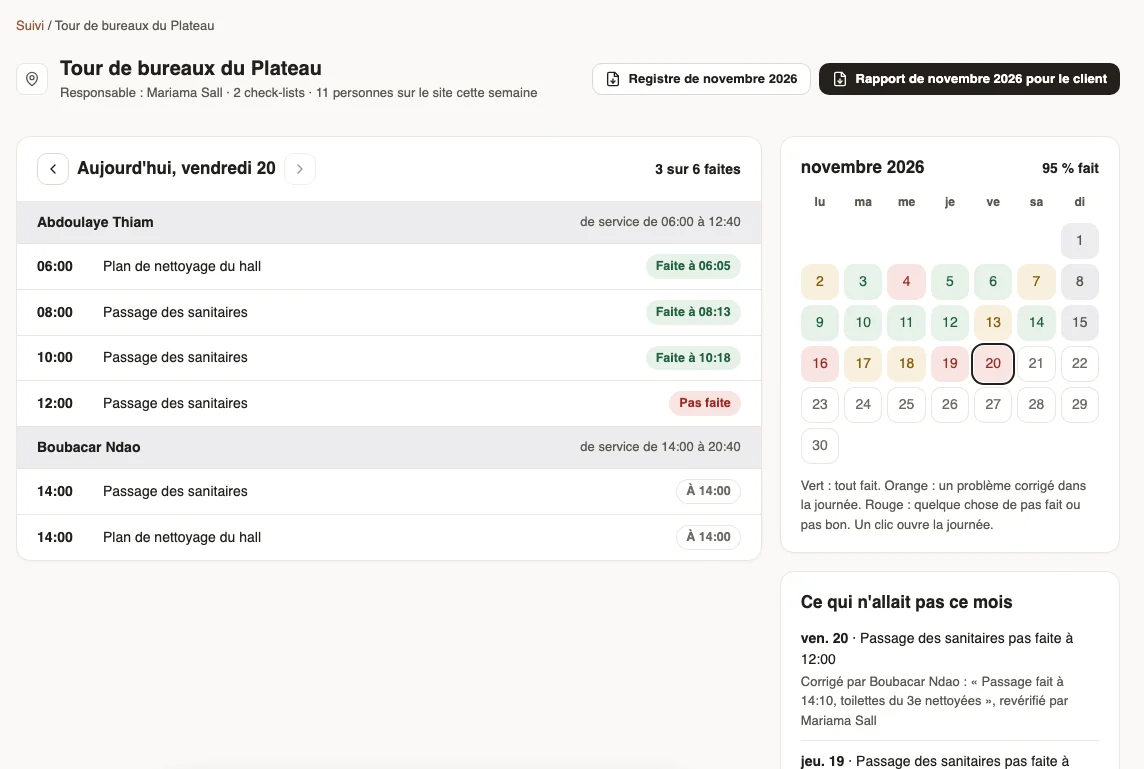
The 12 o’clock toilet round is not done at the office tower. The supervisor, who only sees her two sites, sees it straight away.
She gives it to the agent of the 2 pm team, who does it and says so on his phone.
On Sundays the tower is closed: nothing is asked, the day stays grey. The month’s report goes to the client with 93% of rounds done, and every miss explained.
Proof of each round, hour by hour: what the client asks for when they complain.
Security
The night patrols, proven to the client
Patrols at 10 pm, midnight, 2, 4 and 6 am: the night guard gets them, from each site’s schedule.
One night a power cut prevents two patrols. The guard reports it; the supervisor marks it settled with the cause.
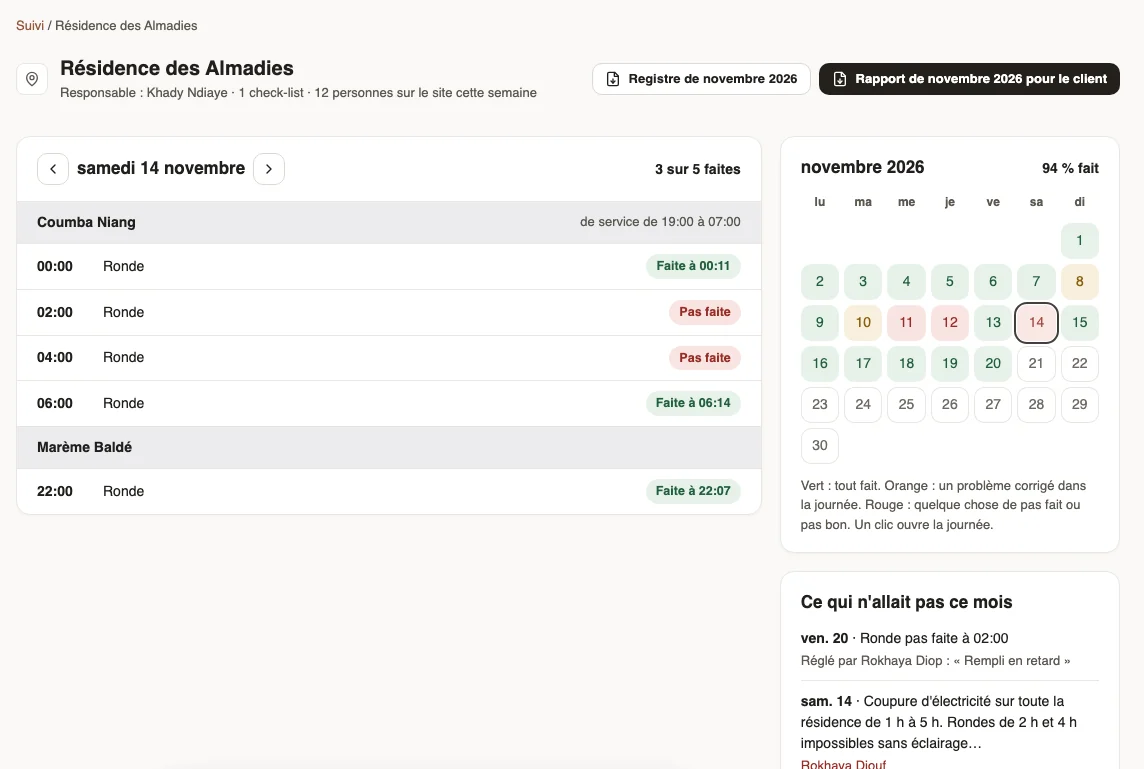
At the end of the month, the residence gets its report: every night, every patrol, and why two were missed. The invoice is not disputed.
The night of the 14th: the 2 and 4 am patrols not done, the power cut in the history.
Factory
A weighing out of range, a batch set aside
Every two hours, the operator weighs a pack: right between 495 and 505 g. At 11 am he weighs 482 g; the problem is created on its own.
He adjusts the doser and writes it down: “recalibrated, checked again at 500 g, batch set aside”. The line start-up missed at 6 am is chased with one click.
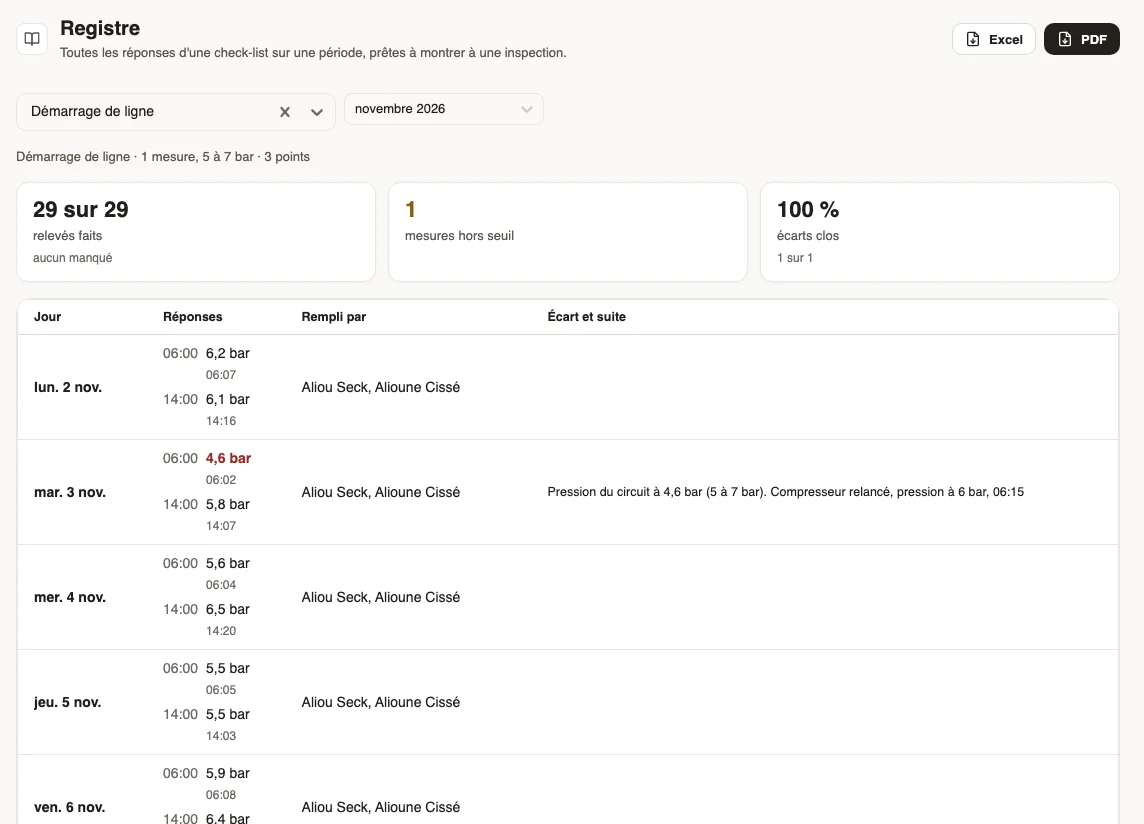
For the audit, the register gives every reading with the time, the person and the follow-up, in Excel or PDF.
29 start-ups out of 29; the 4.6 bar pressure of 3 November and what was done.
A site’s day
Sorted by person on duty
The schedule says who was there. So the follow-up never has to ask “who should have done it”: it knows, and a closed site does not count as a miss.
09:41
WeplanifySC
Plateau office tower, Friday 20Demonstration data
Time
Checklist
Person
State
08:00
Toilet round
Abdoulaye Thiam
done at 08:07
10:00
Toilet round
Abdoulaye Thiam
done at 10:03
12:00
Toilet round
Abdoulaye Thiam
not done
14:00
Toilet round
Boubacar Ndao
at 2 pm
The 12 o’clock round was given to Boubacar Ndao, of the 2 pm team, then checked again.
09:41
WeplanifySC
November report for the clientDemonstration data
Site
Planned
Done
Rate
Plateau office tower
102
95
93%
Mermoz clinic
116
110
95%
Mbao warehouse (security)
95
94
99%
With, for every day something was wrong, what was done and by whom.
In detail
What the module can do
01
Your trade’s checklists
Sixteen ready-made checklists for eight trades, put on your sites in one click, then adapted.
02
Your own on one page
Right or not right, a reading with its limits, a number, a photo, a text. The preview says who will do it today.
03
When it is needed
At a fixed time, at every shift start, at random in the week, or on an event such as a room released.
04
The problem followed to the end
Given to a person with a deadline, chased, settled with a photo, checked again by the manager.
05
Everyone their own sites
A site manager only sees their sites, a team lead only their agents. Management sees everything.
06
Register and client report
The month’s register in Excel or PDF, and a report per site ready to send.
Why it works
You follow sites, not lines
Nobody reads a hundred lines of checks a day. The follow-up only shows at the top what is waiting for someone; the rest reads at a glance, one card per site and one coloured line per day. And because everything starts from the schedule, the right person gets the right checklist at the right time, without anyone organising it.