
The cost of day labour
In Weplanify, the day labourers' History tab gives the month's cash out by site and by job, compared with the previous month, and every day.
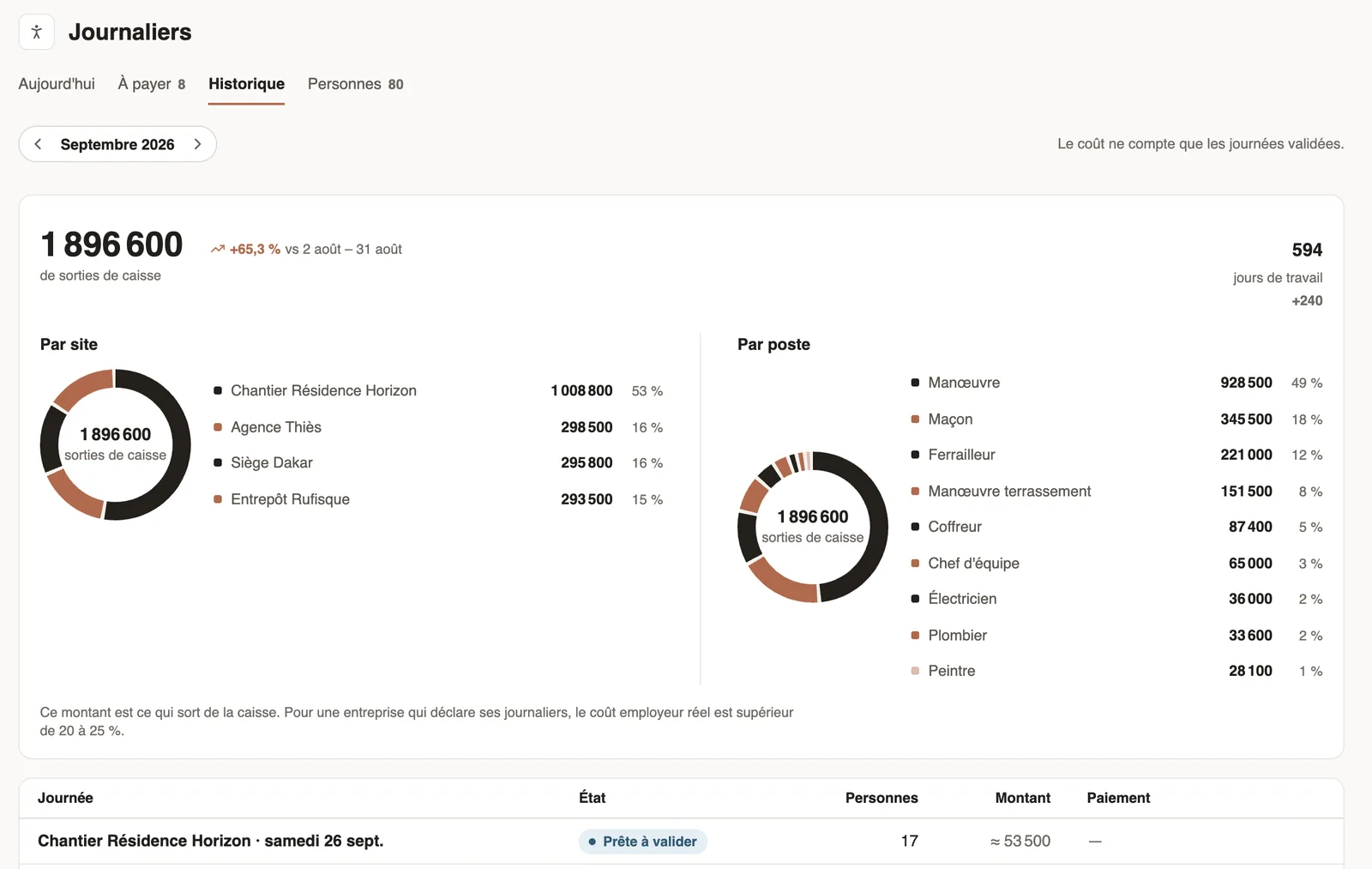
In Weplanify, the History tab of the Day labourers screen sums up what day labour cost over the chosen month.
Steps
- In Day labourers → History, choose the month.
- Read the cash out and working days, compared with the previous month.
- Look at the By site and By job breakdown.
- Further down, each day: state, people, amount and payment; a click opens its detail.
Good to know
- Cost only counts validated days; a day still to validate is estimated ("≈").
- This is what leaves the cash box: if you declare your day labourers, add the contributions required in your country.
- These costs also feed the cost analysis.
Go further
Analyse costs by site, job or departmentIn Weplanify, the cost analysis adds up the month's salaries, day labourers and expenses, then splits them by site, by job or by department, month by month.Manage day labourers: arrivals, days and paymentsIn Weplanify, follow the workers paid by the day: need announced, arrivals on site, validated day, then payment in cash or by mobile money too.Pay the day labourersIn Weplanify, tick the validated days to pay together, see who gets what and how much cash to take out, then record the payment of those days.