
The dashboard Costs card
In Weplanify, the dashboard Costs card gives the payroll's employer cost, the change from the previous period, what explains it and the cost of each site.
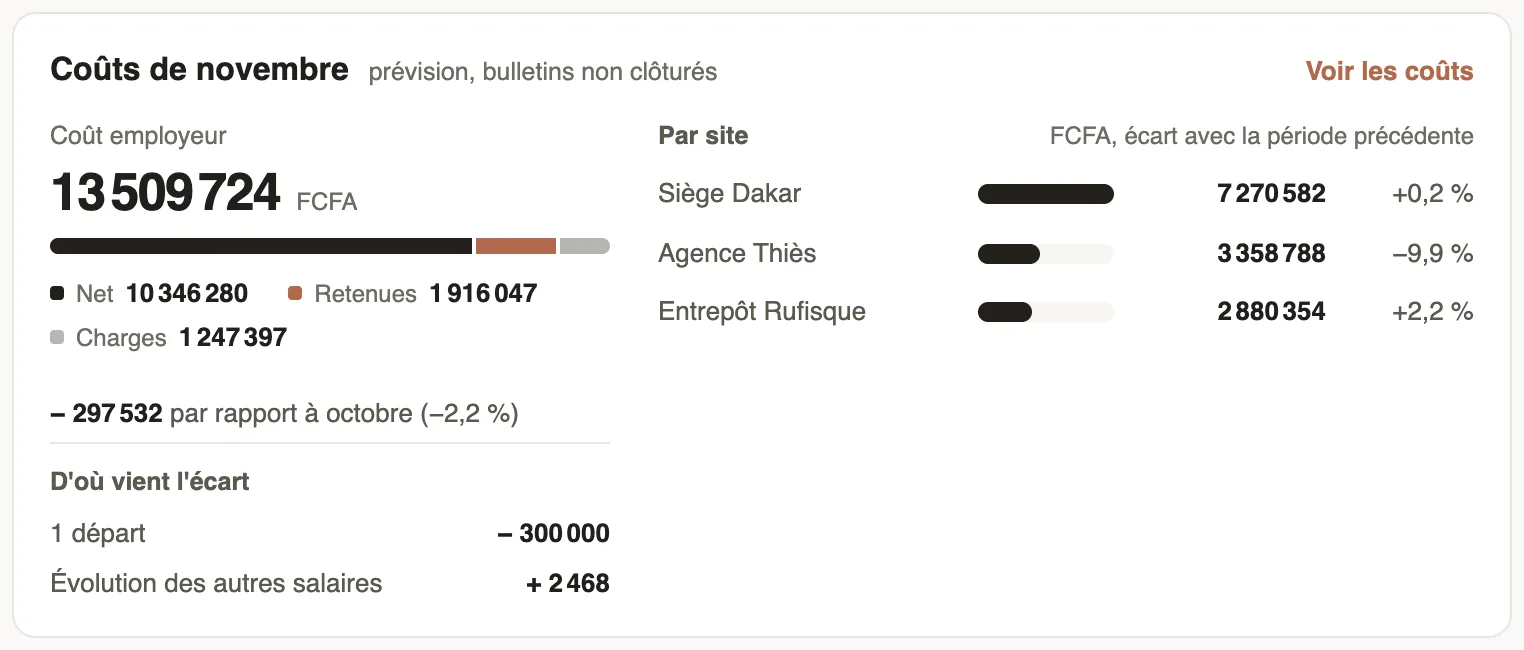
In Weplanify, the dashboard Costs card sums up what the period's salaries cost, for people with payroll access.
How to read it
- Employer cost: the total, split into the Net paid to employees, Deductions and employer Contributions.
- The change from the previous period, then Where the gap comes from: hires, departures and the change in other salaries.
- By site: the cost of each site and its change from the previous period.
- "forecast, payslips not closed": the figures will move until the payroll closing.
Good to know
- In month view, the card shows the current payroll once its payslips are computed, otherwise the last closed month. It also follows the quarter or year chosen at the top.
- See costs opens the cost analysis, which adds day labourers and expenses.
Go further
Close the month, pay salaries and declareIn Weplanify, closing locks the payroll month, publishes payslips to employees and prepares the next month; the step then helps you pay and declare.Analyse costs by site, job or departmentIn Weplanify, the cost analysis adds up the month's salaries, day labourers and expenses, then splits them by site, by job or by department, month by month.The Weplanify dashboardIn Weplanify, the dashboard sums up your activity: the period's figures, costs, items to handle, payroll progress and today's attendance at a glance.