
See who has arrived today from the dashboard
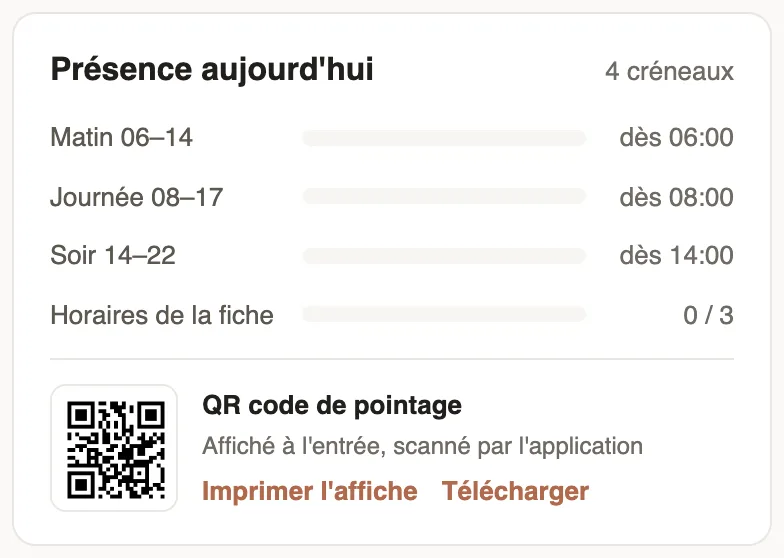
In Weplanify, the dashboard's Attendance today card counts live, shift by shift, the employees who have already arrived out of all those expected.
In Weplanify, the dashboard's Attendance today card shows who has arrived among the employees expected today, based on the schedule and their clock-ins.
How to read it
- One line per shift of the day (Morning 06–14, Day 08–17, Evening 14–22…): arrived out of expected. Late arrivals have their own colour in the bar.
- Employee hours groups the employees with no shift, expected according to the hours on their record.
- A shift that has not started yet shows its start time ("from 06:00").
- Without payroll access, the card shows the day's total (present, late, not clocked in, later today) and the names of late employees, with Call for those who have not clocked in.
Good to know
- The card only shows to people with access to the Time clock module.
- The day's detail is in the daily list.
- The bottom of the card gives the clock-in QR code.
Go further
The team planningIn Weplanify, the planning says who works, when and where, week after week; the slots stay as drafts until you publish them to your employees.Employee time clockIn Weplanify, the Time entries screen shows, day by day, each employee's arrival and exit against what was planned, and what is left to fix.See who is present, late, without an exit or absentIn Weplanify, the tabs of the day's list sort employees into present, late, no exit, absent or rest day, with a count for each of the groups.Print the clock-in QR codeIn Weplanify, print from the dashboard the clock-in QR code poster, to put up at the site entrance so that employees can clock in with their phone.An employee's hours, days off and overtimeIn Weplanify, the usual hours on the record serve as the reference on days when the employee has neither a shift in the planning nor a standard week.The Weplanify dashboardIn Weplanify, the dashboard sums up your activity: the period's figures, costs, items to handle, payroll progress and today's attendance at a glance.