
Follow the monthly payroll from the dashboard
In Weplanify, the dashboard Payroll card shows where the month's payroll stands, step by step, what blocks the payslips and the time left before closing.
In Weplanify, the dashboard … payroll card follows the current monthly payroll, for people with payroll access.
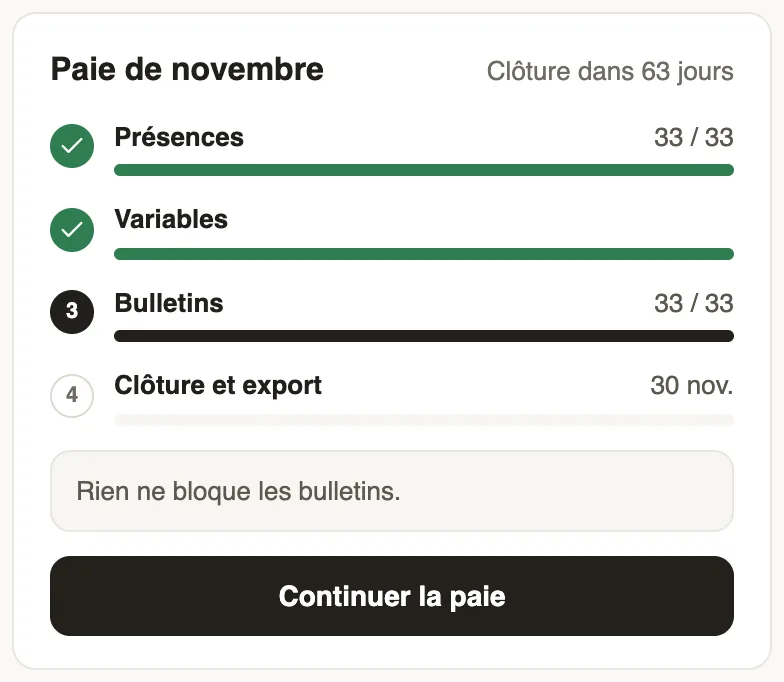
How to read it
- At the top right, the deadline: "Closes in … days", "Closes today", or the delay in red.
- Four steps, each with its progress: Attendance (employees ready out of the total), Variables, Payslips, then Closing and export with its date.
- A box says whether items must be fixed before computing, and how many payslips are affected; otherwise, "Nothing blocks the payslips".
Steps
- Click Fix or Continue payroll: the month's payroll opens at the current step.
- With no payroll open, the card offers Start payroll.
Good to know
- Once the month is closed, the card shows "Payroll closed" and Open payroll.
- Step details: attendance, variables, payslips and closing.
Go further
Follow the monthly payroll step by stepIn Weplanify, the Monthly payroll page shows where payroll stands: the next step, what is left to settle, the provisional figures and the five steps.Prepare the month's time and absencesIn Weplanify, the Time and absences step gives each employee's paid days, leave, absences and overtime, taken from the source chosen for their site.Check the month's variable elementsIn Weplanify, the Variable elements step sums up the bonuses, benefits in kind, advance deductions and expense claims that will be on the month's payslips.Check, approve and print payslipsIn Weplanify, the Payslips step shows the month's payslips: totals, each person's gross and net, preview, recompute, approval and printing in one PDF.Close the month, pay salaries and declareIn Weplanify, closing locks the payroll month, publishes payslips to employees and prepares the next month; the step then helps you pay and declare.The Weplanify dashboardIn Weplanify, the dashboard sums up your activity: the period's figures, costs, items to handle, payroll progress and today's attendance at a glance.