
Employee, manager, administrator: who sees what in Weplanify
In Weplanify, each person has a role that sets what they see: their own data, the employees of the groups they manage, or the whole company at once.
In Weplanify, the role is chosen in the Access tab of the employee record, in the Role and access card.
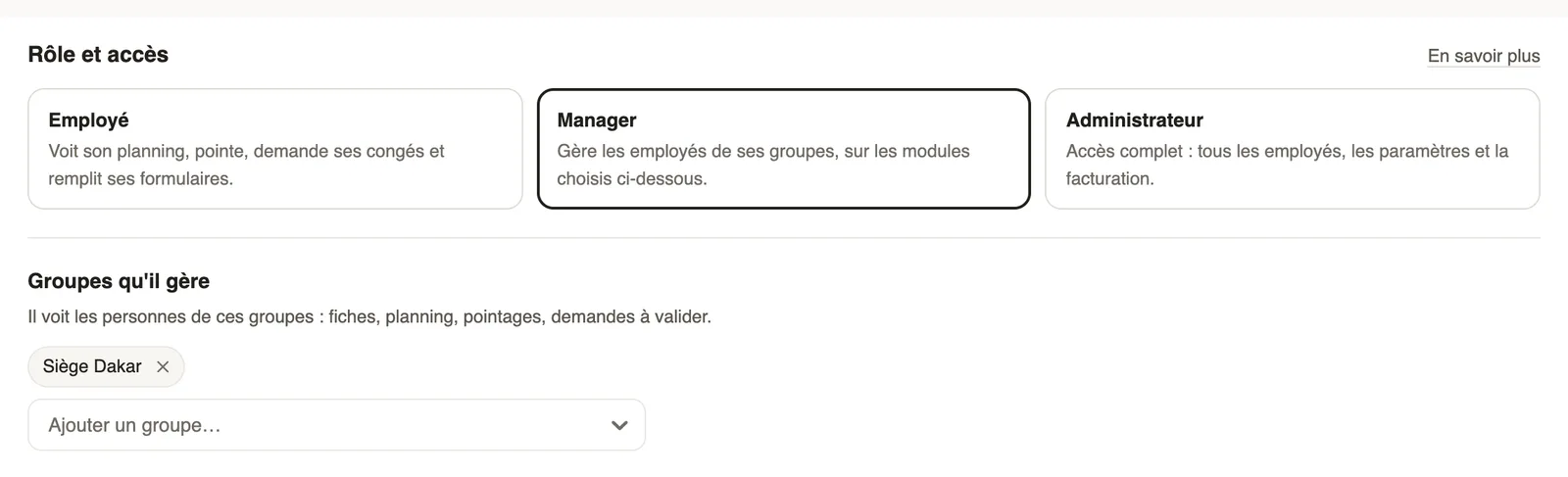
The three roles
- Employee: sees their schedule, clocks in, requests leave and fills in their forms.
- Manager: manages the employees of the groups they manage (records, schedule, time entries, requests to approve), on the chosen modules. Without a group, they only see their own data.
- Administrator: all employees, the settings and billing. Salaries and payroll also require Payroll access.
Good to know
- A sentence at the bottom of the tab sums up what the person will see; click Save settings.
- On their dashboard, a manager reads what they manage: "You manage…" with their groups and modules.
- Step by step: give a role and access.
Go further
The employee recordIn Weplanify, the employee record brings together everything about a person in five tabs, with sections that you edit one at a time, separately.A manager's access by module: none, view or manageIn Weplanify, a manager only opens the chosen modules, for the employees of their groups: View to consult, Manage to create, edit and approve.Give an employee a role and accessIn Weplanify, make an employee a manager or an administrator from the Access tab of their record: role, groups they manage and what they can do.Getting started with WeplanifyIn Weplanify, the web is for managers and the mobile app is for employees: here is where to start, from creating the account to the first published schedule.The Weplanify dashboardIn Weplanify, the dashboard sums up your activity: the period's figures, costs, items to handle, payroll progress and today's attendance at a glance.