
Submit an advance request for another employee
In Weplanify, let a manager or a timekeeper submit an advance or loan request on an employee's behalf; the request then follows the usual circuit.
In Weplanify, an advance request can be submitted by someone other than the employee concerned: this is delegation, useful for employees without a phone or not used to the app.
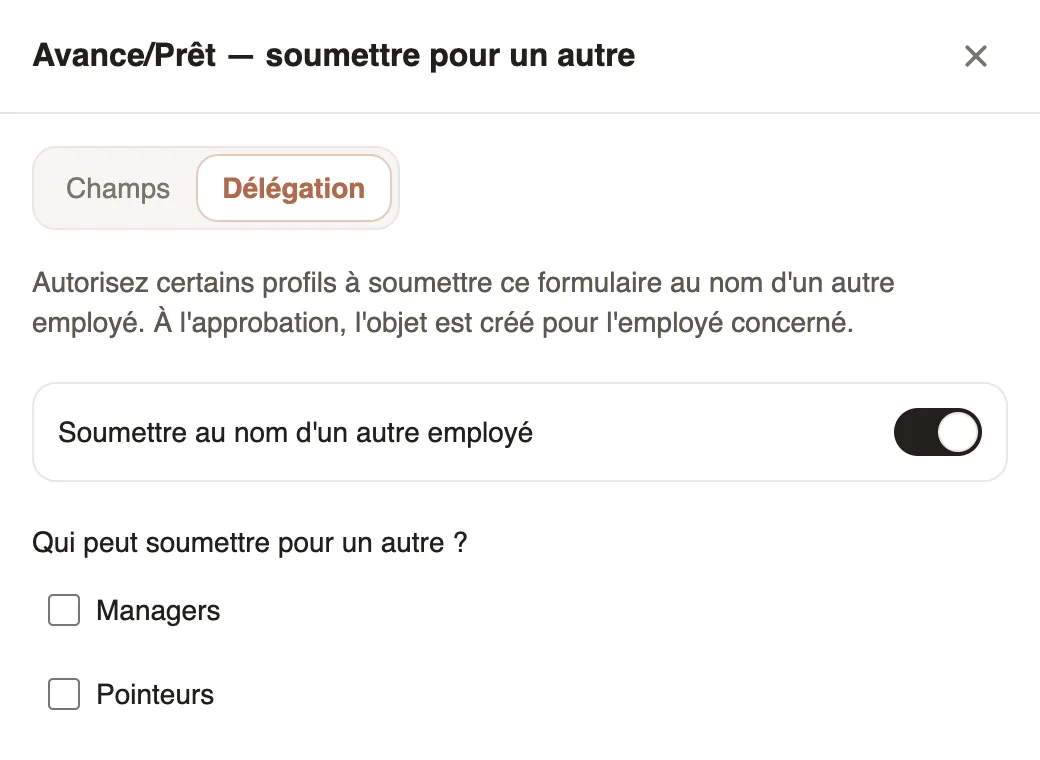
Steps
- In Payroll and costs → Advances & loans, open the More actions menu and choose Submit for another.
- Delegation tab: turn on Submit on behalf of another employee.
- Under Who can submit for another?, tick Managers, Timekeepers or Administrators. None ticked = everyone.
- Narrow down the Selectable employees if needed, then click Save.
Good to know
- In Requests → To handle, the line shows "for" followed by the employee's name; on approval, the advance is created for them, not for the person who submitted it.
- Fields tab: Add a field adds a question to the request form, on mobile and web alike.
- The request follows the advances approval circuit. For expense claims, the setting is in each expense type; see also grant an advance or a loan.
Go further
Handle the requests waiting for youIn Weplanify, Requests → To handle gathers the leave, expense claims, advances and forms waiting for your decision, with the overdue ones first.Configure an approval circuitIn Weplanify, build the approval steps of a leave request, an expense, an advance or a form: the order, the name, the approver and when each step applies.Create an expense typeIn Weplanify, an expense type (fuel, meals, road tolls) decides who pays, how the amount is computed, what must be attached and who approves it.Grant an advance or a loanIn Weplanify, grant a salary advance or a loan repaid every month by a deduction on the payslip, and see its effect on the employee's pay right away.