
Record a day labourer's arrival
In Weplanify, record that a day labourer came to work, on which site, in which job and at what rate; the site manager often does it from their phone.
In Weplanify, an arrival says who works that day and for how much: it is the basis of the payment. The site manager records it on their phone; the office can also add it when they call.
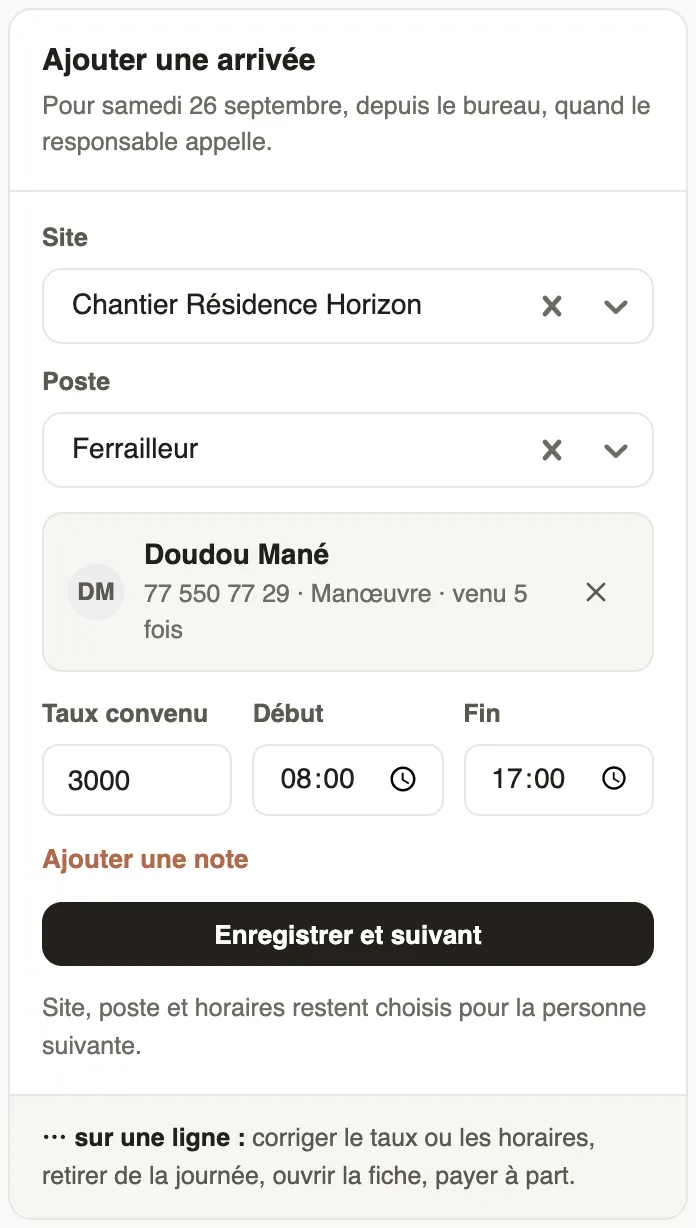
Steps
- In Day labourers → Today, choose the day with the arrows.
- In Add an arrival, choose the Site and the Job.
- Search for the person by phone, ID or name: each result says how many times they came, or "already here". Unknown? New person.
- Check the Agreed rate, the start and end, add a note if needed, then Save and next.
Good to know
- Site, job and hours stay selected for the next person. The same person is only recorded once a day.
- The arrival fills a planned position of the same site and job; the agreed rate does not change the usual rate.
- A row's ⋯ button lets you correct the rate or hours, remove the person from the day, open their record or pay them separately. On mobile: day labourers on mobile.
Go further
Announce a need for day labourersIn Weplanify, announce in advance how many day labourers each site needs per job: the site manager sees the need and each arrival fills it in.Manage day labourers from mobileRecord the day labourers who came to work on a site from the Weplanify app, with their position and daily rate.Manage day labourers: arrivals, days and paymentsIn Weplanify, follow the workers paid by the day: need announced, arrivals on site, validated day, then payment in cash or by mobile money too.Register a day labourer in the fileIn Weplanify, register the day labourers who come back so that a phone or ID number finds them again, with their usual job and their usual rate.