
Validate a day labourers' day
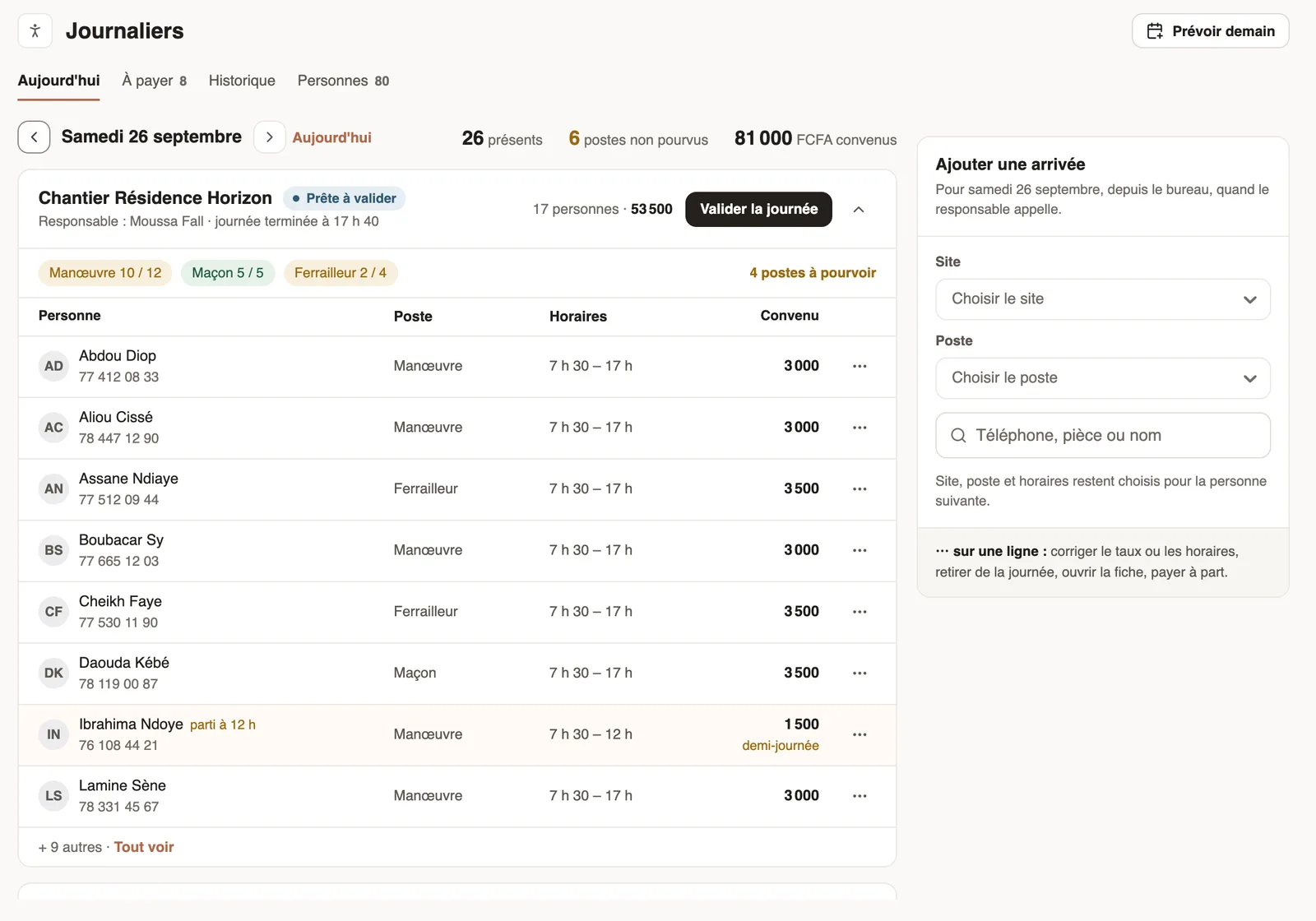
In Weplanify, validate a site's day to freeze what each day labourer is owed; the day then moves to the To pay tab, ready to be paid out in full.
In Weplanify, validating a day freezes the amounts: a raise decided later will never rewrite that day.
Steps
- In Day labourers → Today, choose the day: each site has its card, with its state and total.
- Check the people, jobs, hours and agreed rates; Show all unfolds the list.
- Click Validate the day, then confirm.
Good to know
- Amount = quantity worked × agreed rate (half days included).
- Pay separately (a row's ⋯ menu) validates one person's day alone, to pay them straight away.
- A message warns if the site manager has not finished the day. Next step: pay.
Go further
Pay the day labourersIn Weplanify, tick the validated days to pay together, see who gets what and how much cash to take out, then record the payment of those days.Manage day labourers from mobileRecord the day labourers who came to work on a site from the Weplanify app, with their position and daily rate.Manage day labourers: arrivals, days and paymentsIn Weplanify, follow the workers paid by the day: need announced, arrivals on site, validated day, then payment in cash or by mobile money too.Finish the day labourers' day in the eveningIn Weplanify, the site manager finishes the day in the evening: who left early, who was absent. The day then becomes ready to be validated too.