
Finish the day labourers' day in the evening
In Weplanify, the site manager finishes the day in the evening: who left early, who was absent. The day then becomes ready to be validated too.
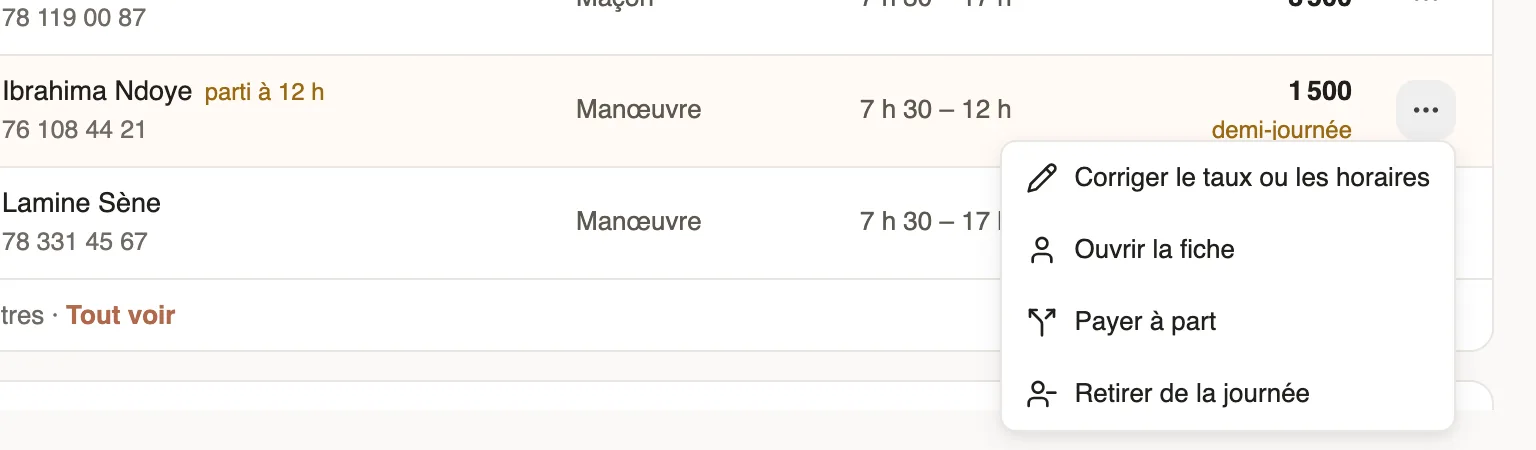
In Weplanify, at the end of the day, the site manager confirms on their phone who really worked. At the office, the Day labourers screen then shows "day finished at …" and the Ready to validate state.
Steps
- The site manager finishes the day from the mobile app: departures, absentees.
- In Day labourers → Today, check the site's day: "left at 12", "half day", "absent at clock-out".
- To correct, open ⋯ on the row → Correct rate or hours (or Set a half day).
- Then validate the day.
Good to know
- Once the manager has clocked the day, only the rate and the note can be corrected here; hours are corrected in Time entries.
- Until the day is finished it stays "In progress"; you can still validate it after checking the list.
- The site manager is the employee ticked Attendance manager on their record.
Go further
Manage day labourers from mobileRecord the day labourers who came to work on a site from the Weplanify app, with their position and daily rate.Validate a day labourers' dayIn Weplanify, validate a site's day to freeze what each day labourer is owed; the day then moves to the To pay tab, ready to be paid out in full.Fix an arrival or exit timeIn Weplanify, fix a day's arrival, exit or break from its detail, with a reason kept in the history, or add all the exits that were forgotten.An employee's clock-in settingsIn Weplanify, the Time tracking and leave section of the record sets how the employee clocks in and what, for them alone, differs from company rules.Manage day labourers: arrivals, days and paymentsIn Weplanify, follow the workers paid by the day: need announced, arrivals on site, validated day, then payment in cash or by mobile money too.Merge the time sheets entered on mobileIn Weplanify, review the attendance sheets entered on a phone by a time clerk, then merge them to create the day's clock-ins for everyone listed.