
Remind an approver who does not answer
In Weplanify, automatically remind a silent approver, then hand the request to the substitute or move on to the next step after a delay you choose.
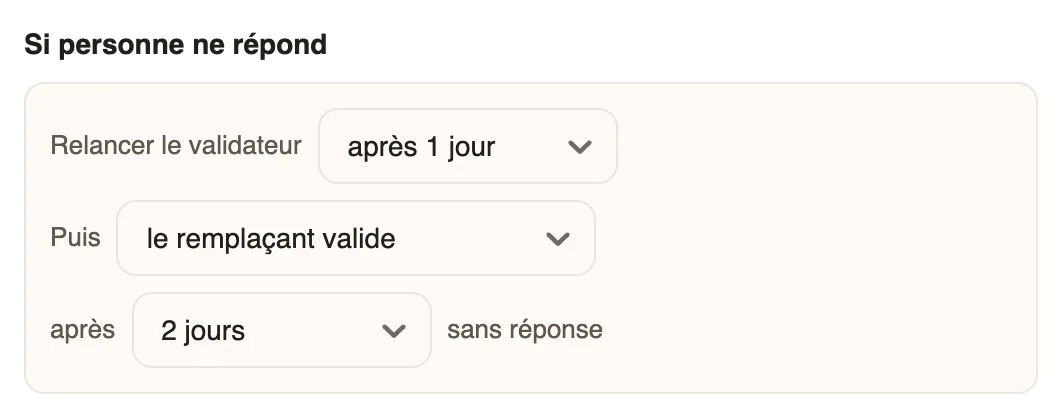
In Weplanify, the If nobody answers part of each step of the circuit keeps a request from getting stuck with an absent or overloaded approver.
Steps
- Open the circuit (the form's Validation tab, the leave Approval circuit, or Settings → Approvals) and click the step.
- In Remind the approver, choose the delay: after 4 h, 8 h, 1 day… or never.
- In Then, choose the substitute approves or go to the next step, then the delay without an answer.
- Click Save.
Good to know
- The reminder is a notification sent to the approver; it changes nothing on the request. The delay without an answer must be longer than the reminder.
- The substitute approves needs a substitute chosen in For the whole circuit. On the last step, going to the next step also hands the request to the substitute.
- In To handle, a request past its step's reminder delay becomes Overdue.
Go further
Configure an approval circuitIn Weplanify, build the approval steps of a leave request, an expense, an advance or a form: the order, the name, the approver and when each step applies.Choose a substitute and people in copyIn Weplanify, a substitute approves instead of an absent, silent or missing approver; people in copy follow every request and decision without approving.Handle the requests waiting for youIn Weplanify, Requests → To handle gathers the leave, expense claims, advances and forms waiting for your decision, with the overdue ones first.Request approval circuitsIn Weplanify, a leave request, an expense claim, an advance or a form answer moves from one approver to the next, following its circuit, until the decision.