
Choose a substitute and people in copy
In Weplanify, a substitute approves instead of an absent, silent or missing approver; people in copy follow every request and decision without approving.
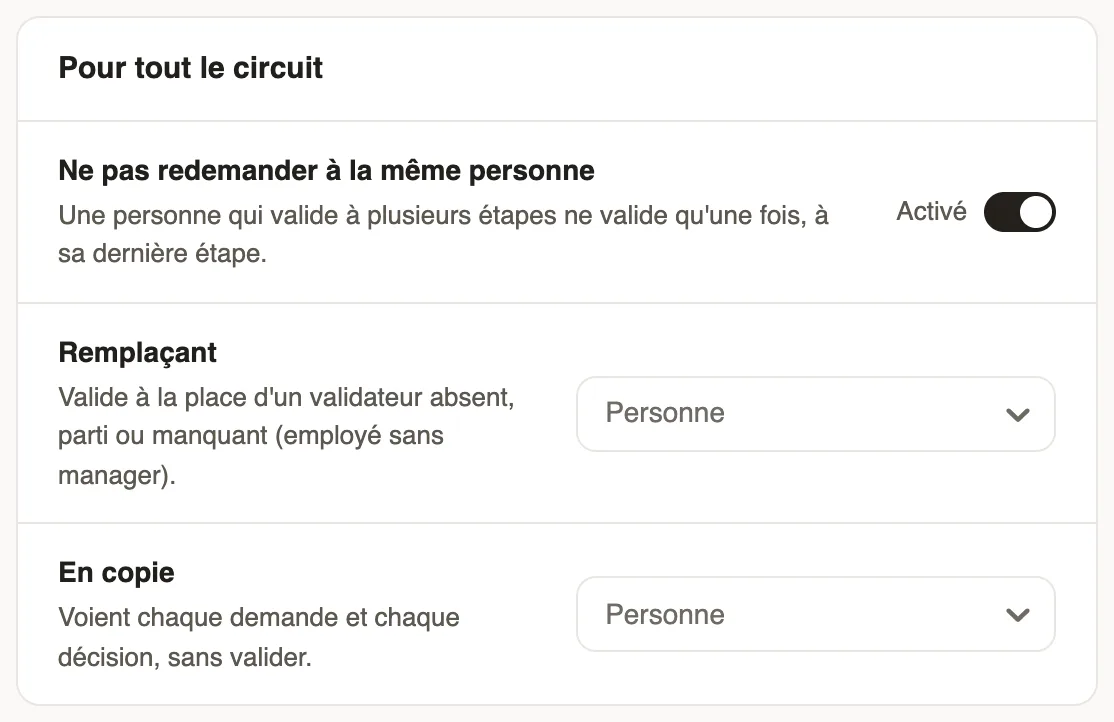
In Weplanify, the For the whole circuit part sets what applies to every step: the substitute, the people in copy and not asking the same person twice. It sits under the steps of each circuit.
Steps
- Open the circuit: a form's Validation tab, the leave Approval circuit, or Settings → Approvals.
- In Substitute, choose the person who approves instead of an absent, departed or missing approver (employee without a manager).
- In In copy, add the people who see every request and decision, without approving.
- Leave Don't ask the same person twice on: an approver present at several steps approves only once.
- Click Save.
Good to know
- The substitute also takes over when an approver does not answer in time, if the step says so: see remind an approver.
- The The employee's manager choice shows how many employees have no manager: their requests go to the substitute. The best fix is still to fill in the manager on the employee record.
- To check who will approve: test the circuit.
Go further
Configure an approval circuitIn Weplanify, build the approval steps of a leave request, an expense, an advance or a form: the order, the name, the approver and when each step applies.Remind an approver who does not answerIn Weplanify, automatically remind a silent approver, then hand the request to the substitute or move on to the next step after a delay you choose.The employee recordIn Weplanify, the employee record brings together everything about a person in five tabs, with sections that you edit one at a time, separately.Test an approval circuit before using itIn Weplanify, pick an employee and describe a request (duration, site, amount) to see, step by step, who will approve it, without sending anything.Choose who approves a step of the circuitIn Weplanify, choose who approves a step: the manager, the head of a site or a department, specific people, or a different person depending on rules.