
Give an employee a role and access
In Weplanify, make an employee a manager or an administrator from the Access tab of their record: role, groups they manage and what they can do.
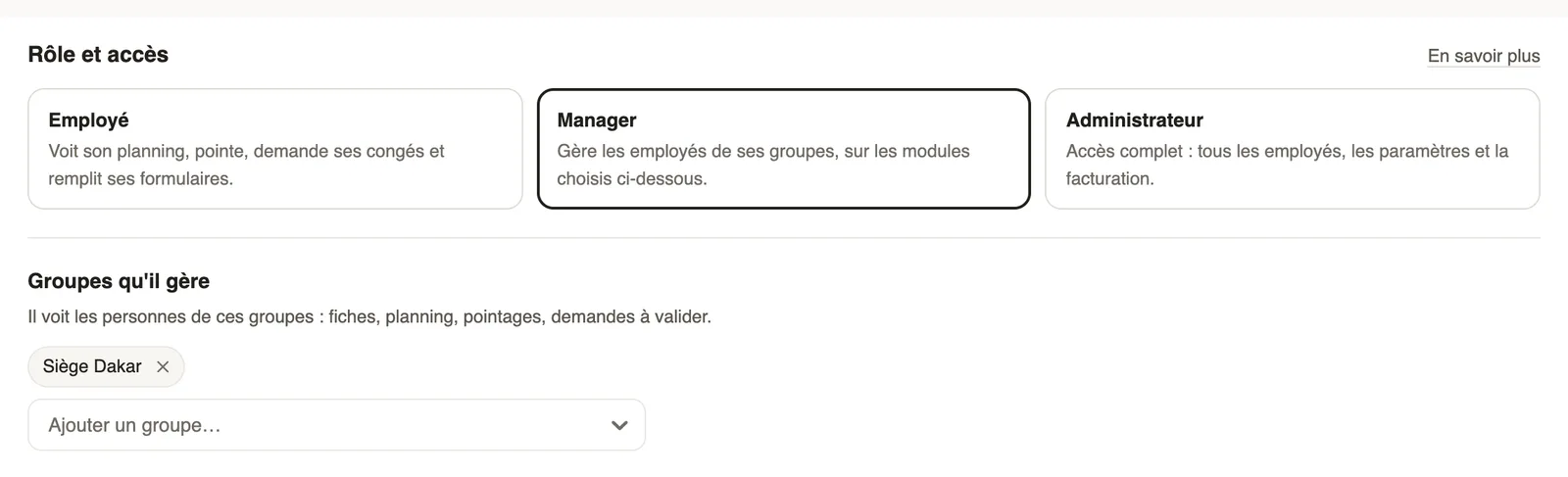
In Weplanify, role and access are set in the Access tab of the record, in the Role and access card.
Steps
- Open the record, Access tab.
- Choose the role: Employee, Manager or Administrator (differences).
- For a manager: add the Groups they manage, then, under What they can do, choose None, View or Manage for each module.
- For an administrator: also tick Payroll access if they must see salaries and run payroll.
- Read the summary sentence, then click Save settings.
Good to know
- A manager without a group only sees their own data: a warning reminds you.
- A group's managers can also be chosen from the group's page.
- For them to sign in on the web, invite them; the email address is set under Web sign-in.
Go further
Employee, manager, administrator: who sees what in WeplanifyIn Weplanify, each person has a role that sets what they see: their own data, the employees of the groups they manage, or the whole company at once.A manager's access by module: none, view or manageIn Weplanify, a manager only opens the chosen modules, for the employees of their groups: View to consult, Manage to create, edit and approve.A group's page: members, managers and usesIn Weplanify, a group's page shows who is in it and why, who manages it and where it is used, before you change it or delete it altogether later.Invite an employee to the web versionIn Weplanify, invite an employee, often a manager, to the web version: they receive an email link to create their password and then sign in.Payroll settingsIn Weplanify, the Payroll group of settings gathers payroll setup, paid leave handling, contributions, pay elements and the accounting export.Manage your employees in WeplanifyIn Weplanify, each employee has a record used everywhere: planning, time clock, leave and payroll. Here is how to create it and keep it up to date.The employee recordIn Weplanify, the employee record brings together everything about a person in five tabs, with sections that you edit one at a time, separately.Create and manage employee groupsIn Weplanify, a group brings employees together for planning, forms, approvals, bonuses and documents, and it also sets a manager's own scope.Search and filter the employee listIn Weplanify, the employee list can be searched by name, filtered by group or criterion, shown as a table or as cards, and it also lists the managers.Payroll in WeplanifyIn Weplanify, the monthly payroll is prepared in five steps, from time, absences and variable elements up to the payslips, the payment and the closing.