
DocumentationForms & requestsWeplanify forms: requests, reports and surveysReceive employees' HR requests
An employee's HR requests on their record
In Weplanify, the Requests tab of the employee record lists their HR requests with status, who decided and documents handed over, plus leave and expenses.
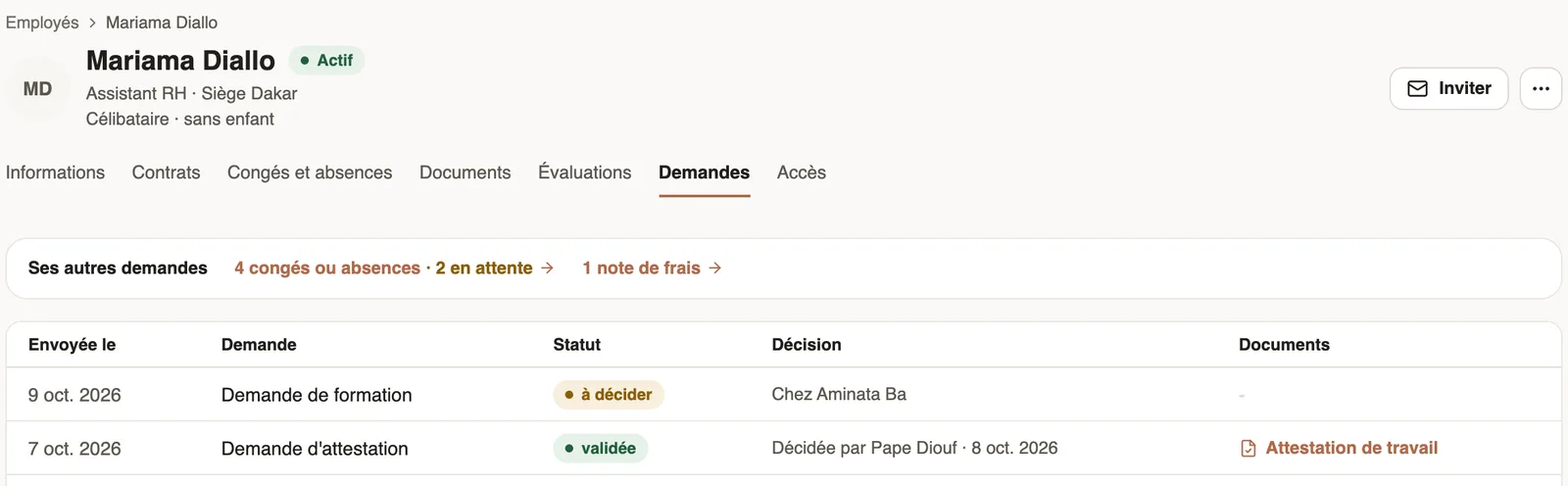
In Weplanify, the Requests tab of the employee record gathers the person's HR requests: those they made and those made for them.
Steps
- Open the employee's record (People → Employees), Requests tab.
- Read the table: Sent on, Request, Status, Decision (who it is waiting with, or who decided and when) and the Documents handed over.
- Click a document to open it, or a row to open the request panel.
- At the top, Their other requests counts their leave or absences and, with payroll access, their advances or loans and expense reports, with those pending; click to go there.
Good to know
- Administrators and managers see the tab, and so does the employee on their own record: their rows then open in My requests.
- A manager only sees the requests where they take part in the circuit; an administrator sees them all.
- Anonymous forms never appear. For every employee's requests: the HR requests home.
Go further
The employee recordIn Weplanify, the employee record brings together everything about a person in its tabs, with sections that you edit one at a time, separately.Follow your requests: correct, remind, cancelIn Weplanify, My requests shows where each of your requests stands and who holds it: correct it, remind the approver or cancel it when needed.Receive employees' HR requestsIn Weplanify, the HR requests home shows what your employees can request and who decides, then their requests, with those waiting listed first.