
Document statuses and expiry
In Weplanify, understand the Valid, Expiring soon and Expired statuses of a document, and those of a paper requested by collection: To upload, To check.
In Weplanify, a document gets a status computed every day from its expiry date, and a paper requested by collection follows its own path.
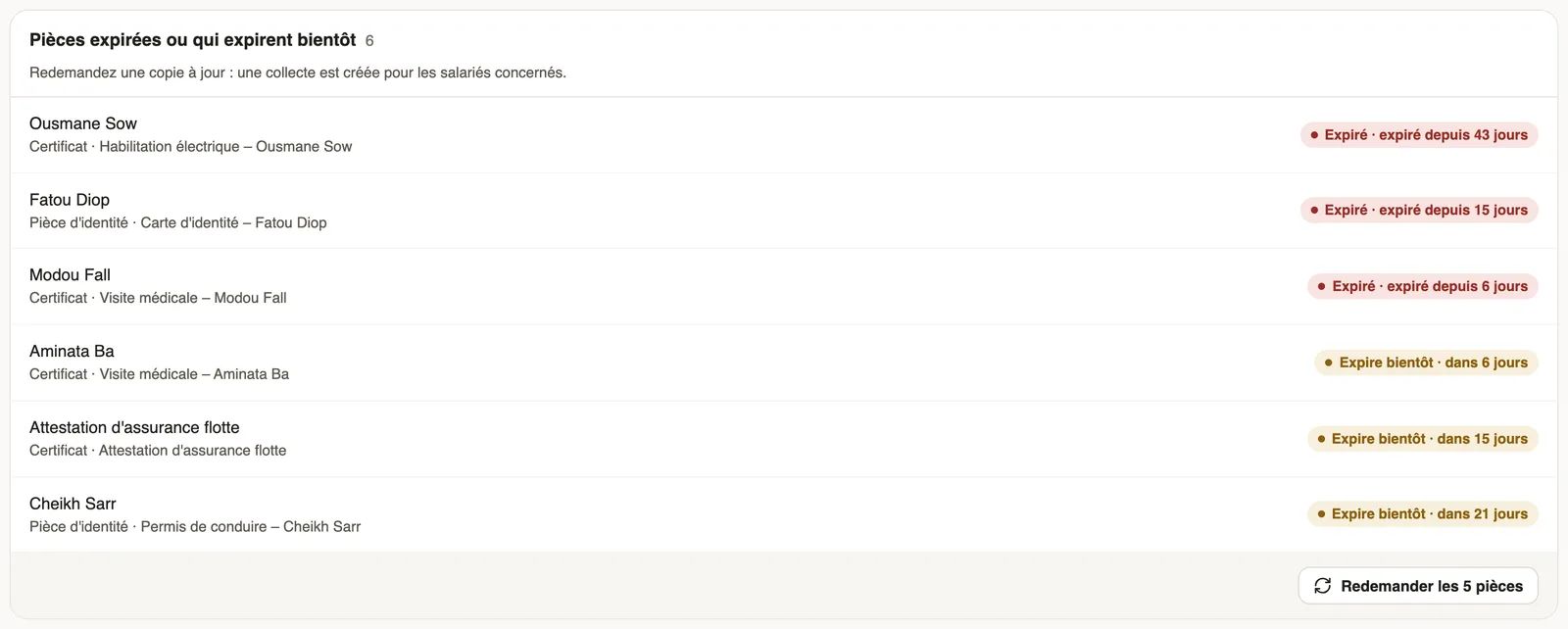
A document
- Valid: the expiry date is more than 30 days away, or the document has none ("No expiry").
- Expiring soon: it comes within 30 days.
- Expired: it has passed.
A paper requested by collection
- To upload: the employee has not sent it yet.
- To review: it was uploaded and waits for your decision (approve papers).
- Approved: HR accepted it.
- Rejected: refused with a reason; the employee can upload another one.
- A collection past its deadline is marked Late.
Good to know
- Expired or soon-to-expire papers are requested again from To do.
- The staff files sum these statuses up per employee: Up to date, Requested, Missing, To sign…
Go further
Request a document from your employees (collection)In Weplanify, a collection requests the same paper (ID card, bank details, medical certificate…) from a group of employees, with a deadline to meet.Follow a collection and approve papersIn Weplanify, check the papers uploaded for a collection, approve them or refuse them with a reason, and upload a paper on an employee's behalf.Handle pending documents: the To do tabIn Weplanify, the To do tab lists papers to approve, signatures still pending, expired papers to request again and the collections in progress.Spot incomplete staff filesIn Weplanify, Staff files show for each employee where their contract, ID document, collections and documents to sign stand, in a single row.HR documents in WeplanifyIn Weplanify, the Documents module files HR papers, spots incomplete staff files, gets PDFs signed and collects documents from your employees.Add a documentIn Weplanify, add a file with its name, its type, the employee concerned, its expiry date and whether the employee may download it from the app.The document list and its countersIn Weplanify, the Documents tab lists every filed paper, with the Expired and Expiring soon counters and filters by type, folder, employee and status.