
Check the month's variable elements
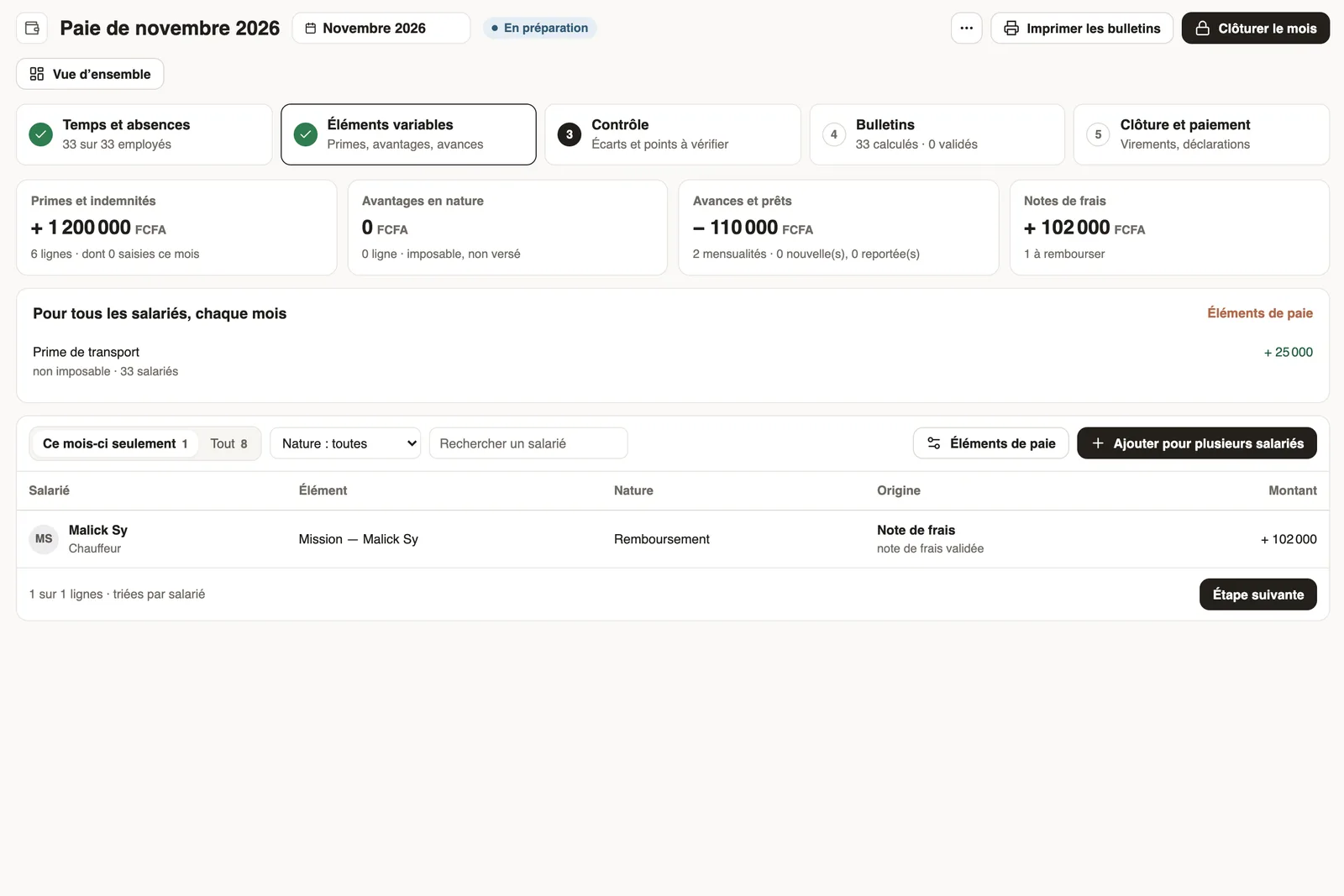
In Weplanify, the Variable elements step sums up the bonuses, benefits in kind, advance deductions and expense claims that will be on the month's payslips.
In Weplanify, the Variable elements step shows everything added to the contract salary this month, by nature and by employee.
Steps
- In the monthly payroll, open the Variable elements step.
- Read the totals: Bonuses and allowances, Benefits in kind, Advances and loans (instalments deducted) and Expense claims to repay.
- Go through the list: each row gives the employee, the element, its nature (earning, benefit, deduction, reimbursement), its origin and its amount.
- For a one-off amount, click Add for several employees.
Good to know
- Permanent elements are set in the pay elements; advances in Advances & loans; expense claims in Expenses.
- An advance request or an expense claim only affects payroll once approved.
- After a change, recompute the payslips.
Go further
Pay elements: bonuses, benefits, advances and deductionsIn Weplanify, the Pay elements page lists what can appear on a payslip: bonuses, benefits in kind, advances and deductions, for whom and when they apply.Grant an advance or a loanIn Weplanify, grant a salary advance or a loan repaid every month by a deduction on the payslip, and see its effect on the employee's pay right away.Repay an expense claim on the payslipIn Weplanify, repay an employee, through their payslip, the money they advanced for the company: meals, taxi rides, fuel or a business trip.Check, approve and print payslipsIn Weplanify, the Payslips step shows the month's payslips: totals, each person's gross and net, preview, recompute, approval and printing in one PDF.Payroll in WeplanifyIn Weplanify, the monthly payroll is prepared in five steps, from time, absences and variable elements up to the payslips, the payment and the closing.Close the month, pay salaries and declareIn Weplanify, closing locks the payroll month, publishes payslips to employees and prepares the next month; the step then helps you pay and declare.Follow the monthly payroll step by stepIn Weplanify, the Monthly payroll page shows where payroll stands: the next step, what is left to settle, the provisional figures and the five steps.Follow the monthly payroll from the dashboardIn Weplanify, the dashboard Payroll card shows where the month's payroll stands, step by step, what blocks the payslips and the time left before closing.Decide on pending expense claims and advancesIn Weplanify, decide on expense claims and advance requests from To handle: see their effect on pay, then grant them, refuse them or have them corrected.