
The employee's notifications and e-mails about an HR request
In Weplanify, the employee is told in their language about each decision on their HR request: approved, refused with the reason, to correct or document ready.
In Weplanify, an employee who makes an HR request does not have to come back to check on it: each decision reaches them by notification and, for the important ones, by e-mail.
Steps
- After sending from Make a request, the employee lands on their request in My requests, with the message Request sent: follow it here.
- At each approved step, they get the Step approved notification: the request moves to the next step.
- When the request is accepted, they get Request approved; if a document leaves with the approval, they get Your document is ready instead.
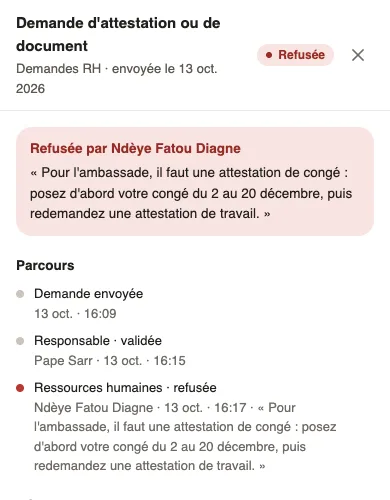
- On refusal, they get Request refused with the person's name and the reason; at the top of their request, a red box repeats them.
- When a correction is asked, they get Changes requested with the approver's message (see correct your request).
Good to know
- An e-mail is also sent for a request approved, refused or to correct, and for a document ready; its See my request, Correct my request or Open my document button opens the request in My requests.
- The e-mail is only sent if the employee has an e-mail address on their record. Notifications arrive in the bell and on their phone.
- Notifications and e-mails are written in the employee's language, otherwise in the company's.
- Approvers are notified when a request is waiting for them, and again when the employee has corrected it.
Go further
Follow your requests: correct, remind, cancelIn Weplanify, My requests shows where each of your requests stands and who holds it: correct it, remind the approver or cancel it when needed.Receive employees' HR requestsIn Weplanify, the HR requests home lists your employees' requests, those to decide first, with the document handed over, then what they can ask for.Hand over the requested document to the employeeIn Weplanify, the circuit's last step prepares or uploads the requested document: it reaches the employee on approval, never if the request is refused.