
Read your evaluation
In Weplanify, the employee is told when their evaluation is ready and reads it on the web: ratings, the manager’s answers and any trial decision.
In Weplanify, an employee only sees their evaluation once it is sent to them. They then get the Your evaluation is ready notification.
Steps
- Click the Your evaluation is ready notification.
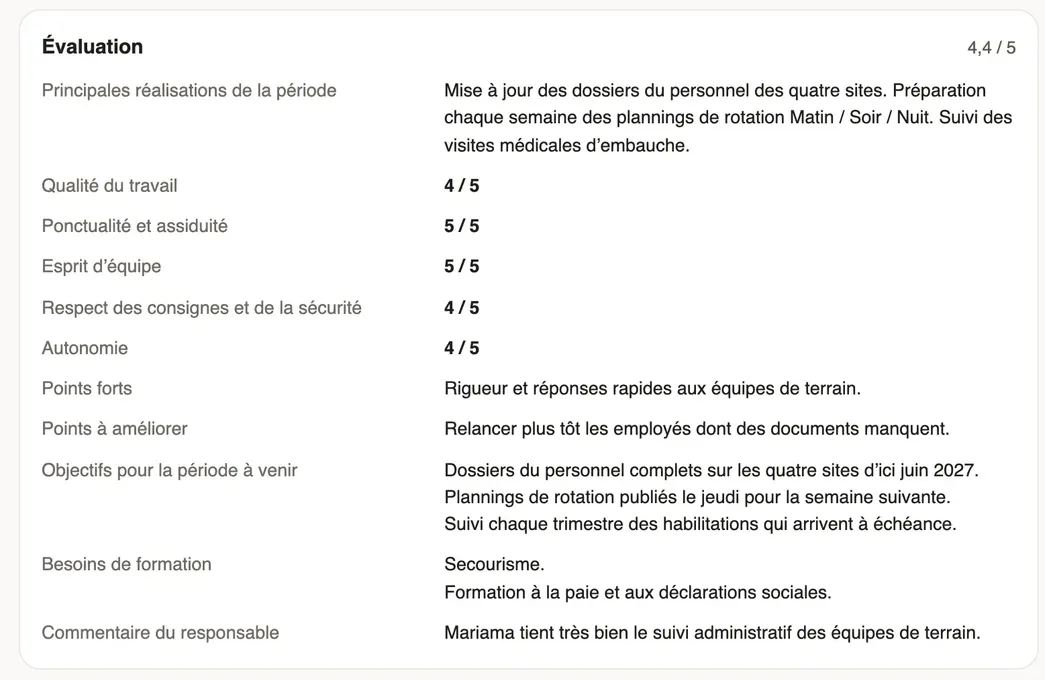
- Read the average rating and each answer of your manager: achievements, ratings, strengths and points to improve, objectives and training needs.
- For an end of trial, the decision shows above, for example "Your trial period is renewed until …".
Good to know
- The To sign status and the banner invite you to read and sign the evaluation in the Weplanify mobile app, with a comment: this signature comes with a next version of the app.
- Your manager and HR see your evaluation; your colleagues do not.
- For HR: review and send an evaluation.
Go further
Review an evaluation and send it to the employeeIn Weplanify, when the HR review is on, each evaluation filled in by a manager waits for your go-ahead before it is sent to the employee concerned.Follow trial ends and annual reviewsIn Weplanify, the Evaluations module follows the ends of trial periods and runs annual reviews, from the manager who evaluates to the employee.Decide what follows a trial periodIn Weplanify, after the manager’s opinion, confirm the employee, renew their trial or end it; ending a trial then opens their final departure.