
Choose who is evaluated and by whom
In Weplanify, the Evaluated people tab of a campaign shows who evaluates whom: change the manager, add someone or remove a person from the list.
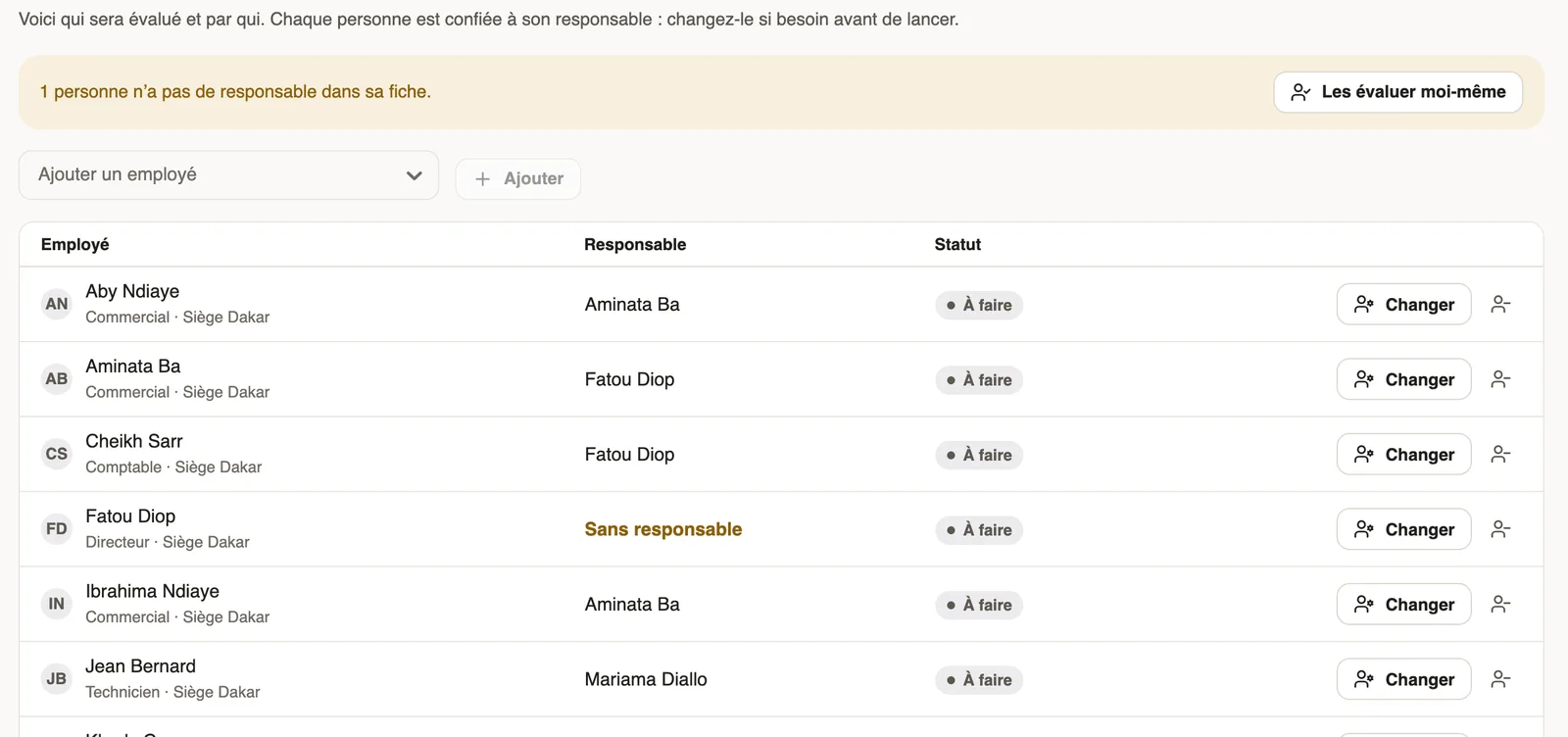
In Weplanify, each person in a campaign goes to the manager written on their record. The Evaluated people tab lets you correct it before or after the launch.
Steps
- Open the campaign, Evaluated people tab.
- If a banner shows people without a manager, click Evaluate them myself, or Change on their row.
- Change: choose the person who evaluates, then Save. They must know the employee's work.
- To remove someone, click the icon right of Change, then Remove: their evaluation is cancelled.
- To add someone, pick them in Add an employee, then click Add.
Good to know
- Only evaluations still to do can change manager or be removed.
- After the launch, the chosen person is told they have an evaluation to do.
- So that the right manager is chosen from the start, keep the manager on records up to date (organisation chart).
Go further
The company org chartIn Weplanify, the org chart shows who reports to whom, by manager, by team or by site, and lets you change a person's manager in a single click.Create and launch an annual review campaignIn Weplanify, a campaign asks each manager to evaluate their team: choose who, the period and the deadline, check the draft, then launch it.