
Make a request: leave, expense, advance or form
In Weplanify, the Make a request screen brings leave, expense claims, advances and forms together: find what you need and send your request.
In Weplanify, Requests → Make a request gathers everything a person can ask for themselves. Employees find the same choice in the mobile app.
Steps
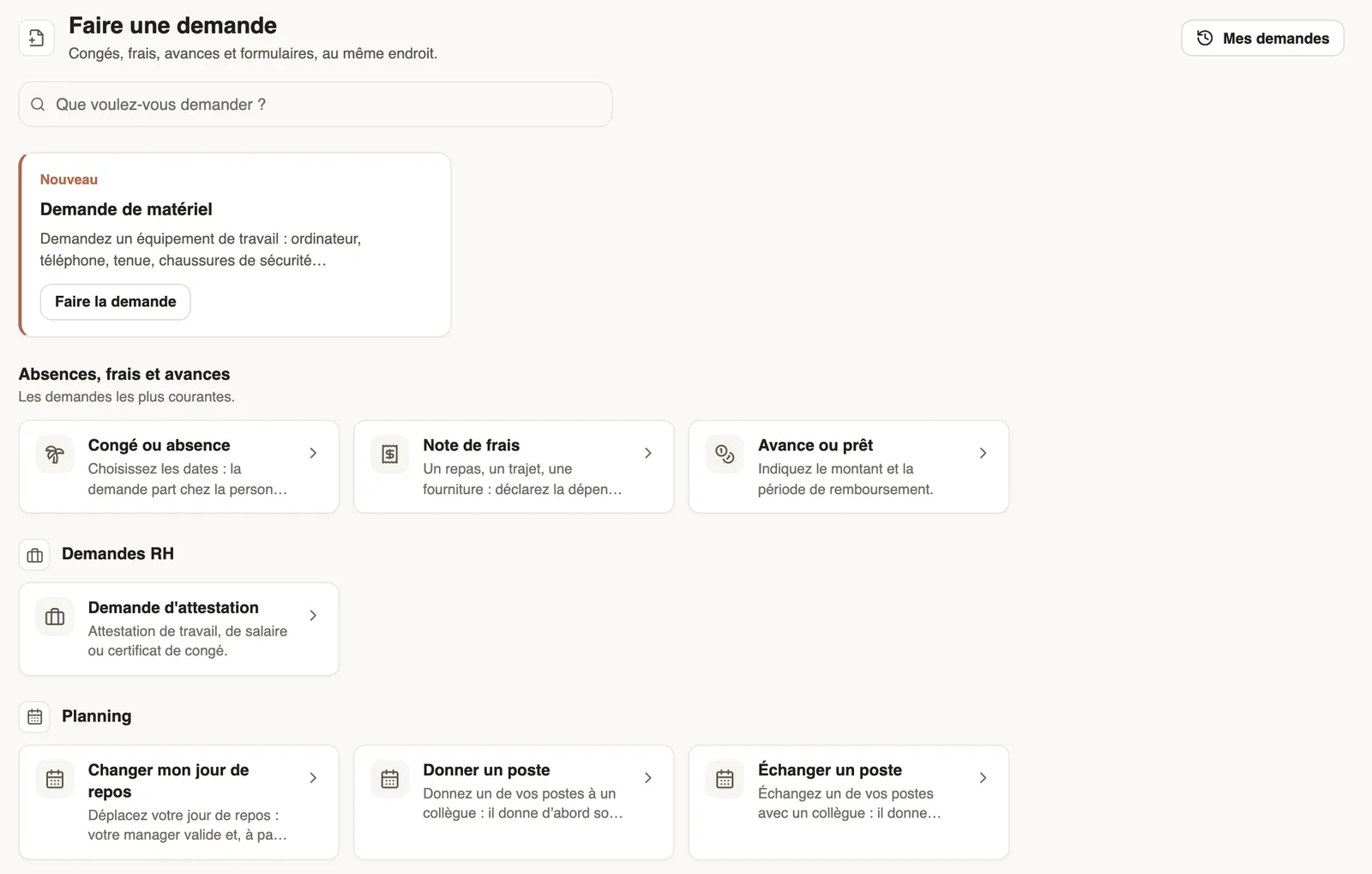
- Open Requests → Make a request, or type in What do you want to ask for?.
- At the top, the New cards show featured forms: Make the request opens them.
- Under Leave, expenses and advances: Leave or absence (the dates), Expense claim (the kind of expense, then the receipt) and Advance or loan (the amount and the repayment).
- Further down, forms are sorted by category, in the order set by the administrator: click the one you need.
- Fill in the form that opens on the side and send it: the request goes to the person who approves it.
Good to know
- Only the forms published for you are shown (who can answer).
- Then follow your requests in My requests.
- A featured form stays at the top for the time chosen when it was published (publish a form).
Go further
Make a request or fill in a form on mobileIn Weplanify, employees make their requests from the app: an expense, an advance, a schedule change, a report or any other form, then follow them.Sort forms into categoriesIn Weplanify, categories sort your forms: their icon, their sentence, who sees them and their order in the employees' Make a request screen.Choose who can answer a form, and whenIn Weplanify, a form's Sharing step sets who can answer it (everyone, some sites, some groups or some people) and during which period of time.Follow your requests: correct, remind, cancelIn Weplanify, My requests shows where each of your requests stands and who holds it: correct it, remind the approver or cancel it when needed.Publish a form and let employees knowIn Weplanify, publish a form and let people know: notification, New card on the home screen, poster; then close it or reopen it whenever needed.Weplanify forms: requests, reports and surveysIn Weplanify, every company form sits in a single list, sorted by category, showing what is waiting for your decision and what is running late.Receive employees' HR requestsIn Weplanify, HR requests is a category of forms (equipment, certificate, working hours) that employees find in their Make a request screen.