
DocumentationForms & requestsThe Forms home and its modulesRecruit: job offers and candidate tracking
Write the report of an interview
In Weplanify, after an interview, record whether it was Positive, Mixed, Negative or Did not come, with a note the team reads and the candidate never sees.
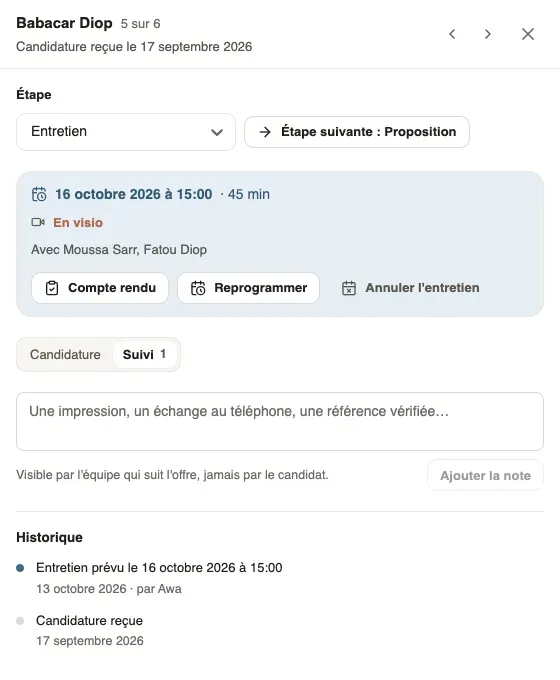
In Weplanify, the report is written in the candidate's file, from the box of their interview. Once the time has passed, the box reminds you: "The time has passed: write down how the interview went."
Steps
- Open the candidate's file and click Report in the interview box.
- Under How did the interview go?, choose Positive, Mixed, Negative or Did not come.
- Add a Note if needed: strengths, doubts, availability, salary expectations.
- Click Save the report.
Good to know
- The report shows in the Follow-up tab, in the History: "Interview of 16 October 2026 at 15:00", followed by the opinion and the note. Change corrects it.
- It is seen by the team following the offer, never by the candidate.
- For an impression outside an interview (a phone call, a checked reference), use Add the note in the Follow-up tab; you can delete your own notes.
- The report does not change the step: then decide with Next step, Reject or Hire.
Go further
Reject an application and tell the candidateIn Weplanify, rejecting an application moves it to the Rejected step; a polite message goes to the candidate only when you switch it on yourself.Hire a candidate and create their employee recordIn Weplanify, hiring a candidate moves them to the Hired step and prepares their employee record, prefilled with their name, phone, job and site.Invite a candidate to an interviewIn Weplanify, an interview is set from the candidate's file: day, time, place or video call, people from the company and an e-mail invitation.