
DocumentationForms & requestsThe Forms home and its modulesRecruit: job offers and candidate tracking
Spot a candidate who already applied
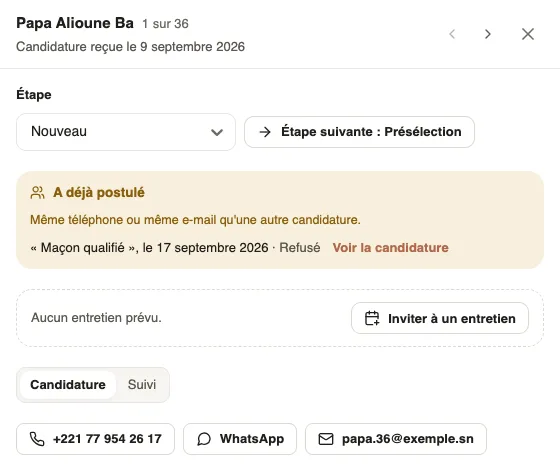
In Weplanify, « Already applied » flags a candidate whose phone or e-mail is on another application, for this offer or another one of yours.
In Weplanify, the same person often applies twice: through the poster then the WhatsApp link, or to two offers. The Already applied mention flags it, so that only one recruiter calls them back.
Steps
- In the Candidates tab, look for Already applied on the candidate's card.
- Open their file: the Already applied box lists each other application, with the offer (or "On this offer"), the date and the step reached.
- Click See the application to open the other application in its offer.
Good to know
- Weplanify compares the phone, even written differently (with or without the country code, with or without spaces), and the e-mail.
- Nothing is merged or deleted: you decide, for example by rejecting the duplicate application (reject an application).
- A candidate whose phone or e-mail matches an employee shows another mention: "… already has an employee record".
Go further
Reject an application and tell the candidateIn Weplanify, rejecting an application moves it to the Rejected step; a polite message goes to the candidate only when you switch it on yourself.Recruit: job offers and candidate trackingIn Weplanify, Recruitment shows your job offers as cards: create an offer, share its link and follow every candidate from application to hiring.