
DocumentationForms & requestsThe Forms home and its modulesRecruit: job offers and candidate tracking
See where an offer's candidates come from
In Weplanify, the Publication tab counts each job offer's applications per channel: poster or QR code, e-mail, WhatsApp, copied link or other.
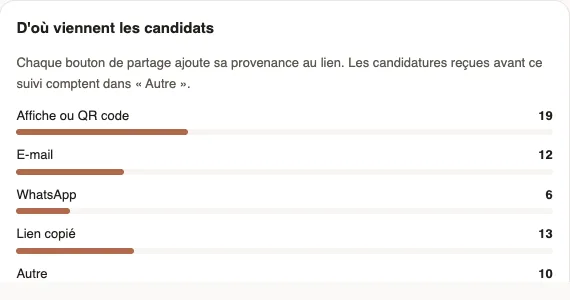
In Weplanify, each share button of the Publication tab adds its channel to the offer's link. The Where candidates come from box then counts the applications received through each channel: you know whether the poster at the Almadies site worked better than the WhatsApp message.
Steps
- Share the offer with the buttons of the Publication tab: Copy, Share on WhatsApp, Send by email or Print a poster. Copy the link, at the top of the page, counts as Copied link.
- Open the Publication tab and read Where candidates come from: Poster or QR code, E-mail, WhatsApp, Copied link and Other.
- For one candidate, open their file: the channel follows the date, for example "Application received on 4 October 2026 through the poster or QR code".
Good to know
- The QR code of the tab and the one on the poster both count in Poster or QR code.
- A forwarded link keeps its channel: a WhatsApp link sent on by e-mail counts in WhatsApp.
- Other groups the applications received before this tracking and those that came through a link with no channel, such as the address copied from Open the page.
- For an ad on a job website, paste the copied link: its applications count in Copied link (publish and share).
Go further
Publish a job offer and share its linkIn Weplanify, publishing an offer opens its application link: copy it, send it on WhatsApp or by email, or print a poster with a QR code to scan.Recruit: job offers and candidate trackingIn Weplanify, Recruitment shows your job offers as cards: create an offer, share its link and follow every candidate from application to hiring.What candidates see of a job offerIn Weplanify, an offer's link opens a page with no account needed: company, job, contract, site, salary, deadline and description, then the form.