
DocumentationForms & requestsThe Forms home and its modulesRecruit: job offers and candidate tracking
Reject an application and tell the candidate
In Weplanify, rejecting an application moves it to the Rejected step; a polite message goes to the candidate only when you switch it on yourself.
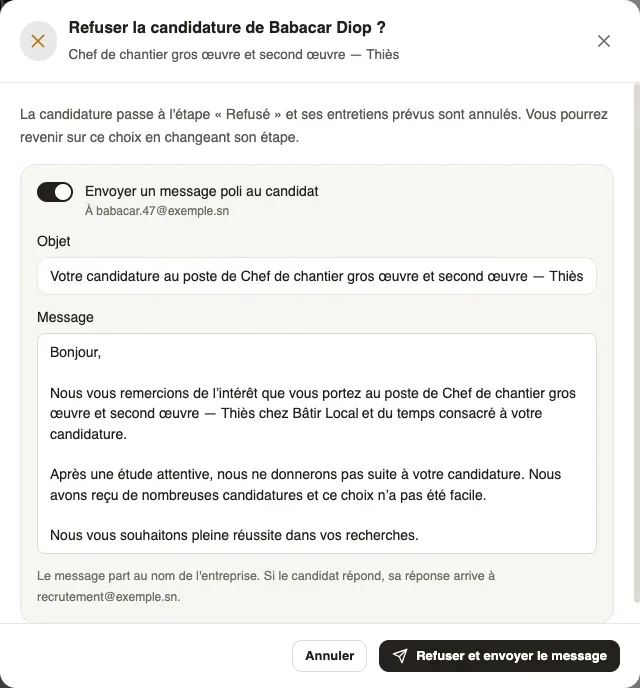
In Weplanify, rejecting an application moves it to the Rejected step and cancels its planned interviews. By default, nothing is sent to the candidate: you decide, for each rejection, whether to write to them.
Steps
- Open the candidate's file and click Reject. Dragging their card to the Rejected step opens the same window.
- To tell them, switch on Send a polite message to the candidate: the Subject and the Message are prefilled with the offer title and your company name. Change them if needed.
- Click Reject and send the message, or Reject if sending stays off.
Good to know
- Sending is off each time the window opens: no message leaves without your choice.
- The message is sent on behalf of the company; if the candidate replies, the answer goes to your account's e-mail address.
- A candidate who left no e-mail cannot be told: the switch is greyed out.
- The message sent shows in the Follow-up tab of their file ("Rejection message sent"). The people invited to their interviews get the cancellation.
- To undo a rejection, change their step. To reject several candidates: move or reject several candidates.
Go further
Move or reject several candidates at onceIn Weplanify, the Select mode of the Candidates tab ticks candidates in one or several steps, so you can move them or reject them all together.Recruit: job offers and candidate trackingIn Weplanify, Recruitment shows your job offers as cards: create an offer, share its link and follow every candidate from application to hiring.Move candidates from step to stepIn Weplanify, the Candidates tab puts each candidate in their step: search, sort, drag their card or open their file to read the application and decide.Write the report of an interviewIn Weplanify, after an interview, record whether it was Positive, Mixed, Negative or Did not come, with a note the team reads and the candidate never sees.Spot a candidate who already appliedIn Weplanify, « Already applied » flags a candidate whose phone or e-mail is on another application, for this offer or another one of yours.