
Offer a self-assessment before the review
In Weplanify, each employee can first answer their own questionnaire; their manager then sees those answers next to each question of the grid.
In Weplanify, the self-assessment is an option of an annual review or an end of mission. Each employee first answers the questions about them, then their manager evaluates them while reading those answers.
Steps
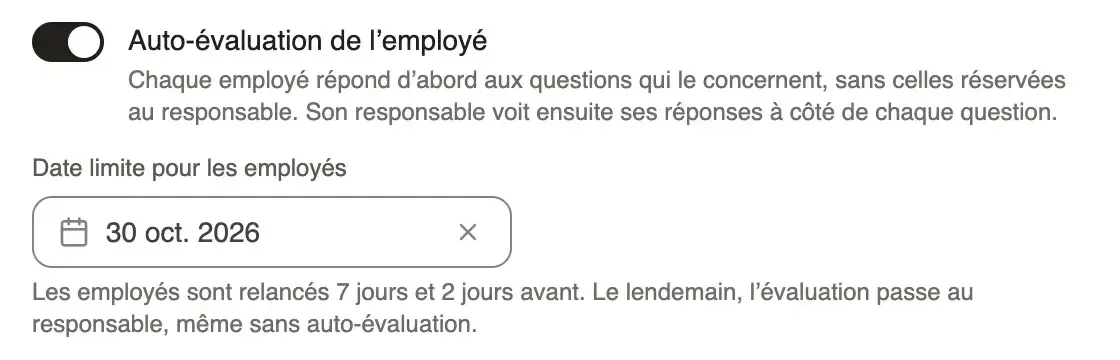
- In New campaign, choose Annual review or End of mission, then turn on Employee self-assessment (create a campaign).
- Choose the Deadline for employees, before the one for managers.
- Create the draft, check the people and the questionnaire, then click Launch the campaign.
- Employees with an account get the Your self-assessment notification (what the employee sees). The others go straight to their manager.
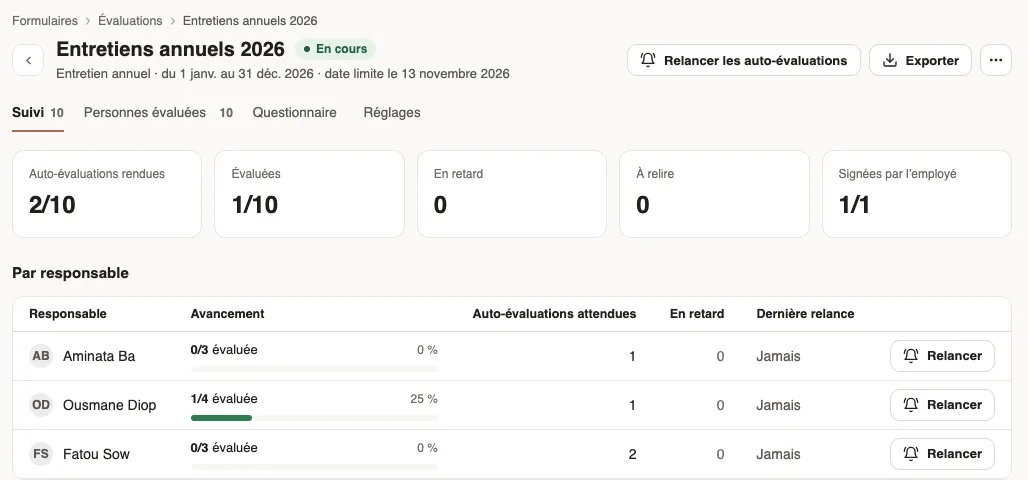
- In the Follow-up tab, follow the Self-assessments received and click Remind self-assessments if needed.
Good to know
- Employees are reminded 7 days and 2 days before their deadline. The day after, the evaluation goes to the manager, even without a self-assessment.
- The manager, or you from the evaluation panel, can Evaluate without waiting: the employee can then no longer answer.
- Questions kept for the manager are not asked to the employee (the questionnaire).
- The manager sees the employee's answer under each question, and the self-assessment rating on the left. HR and the employee then see both answers side by side.
- The option is chosen before the launch and does not exist for an end of trial period.
Go further
Create and launch an evaluation campaignIn Weplanify, a campaign asks each manager to evaluate their team: choose the type, who is evaluated, the deadline and the options, then launch it.Fill in your self-assessmentIn Weplanify, the employee answers the questions of their review before their manager does, from the card on their home page, on a computer or a phone.Adapt the questionnaire of a campaignIn Weplanify, each campaign starts from a ready-made questionnaire: add, edit or move questions before the first answer comes in from a manager.Follow ends of trial and annual reviewsIn Weplanify, the Evaluations module follows ends of trial and runs annual reviews and ends of mission, from the manager who evaluates to the employee.Review an evaluation and send it to the employeeIn Weplanify, when the HR review is turned on, each filled-in evaluation waits for your approval before it is sent to the employee it is about.