
Evaluate employees at the end of a mission
In Weplanify, an End of mission campaign has the team of a project or a client evaluated: the work done, the deadlines and whether you would hire them again.
In Weplanify, an end of mission runs like an annual review, with its own questionnaire. It is used at the end of a project, a mission or a service at a client's.
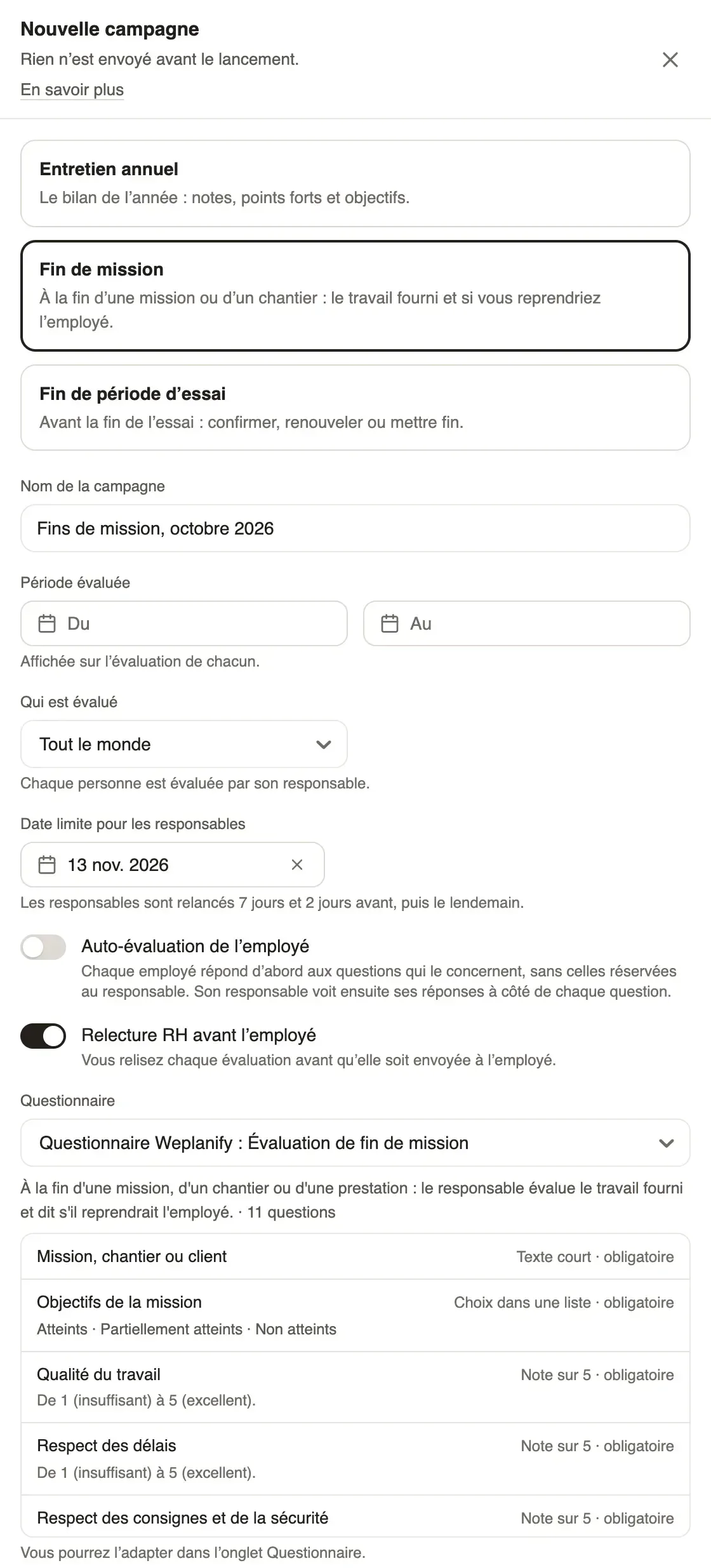
Steps
- In Requests → Forms → Evaluations, click New campaign, then End of mission.
- Give a meaningful Campaign name, for example "Fin du chantier Port de Dakar". The Evaluated period is optional.
- Under Who is evaluated, choose One site or One group that gathers the mission team, then the Deadline for managers.
- Keep the HR review and the self-assessment or not; the Weplanify questionnaire: End of mission review is already chosen.
- Click Create the draft, check the people, then Launch the campaign.
Good to know
- The questionnaire asks for the mission, project or client, whether the mission objectives were met, ratings out of 5 (quality, deadlines, safety, teamwork, relationship with the client), strengths and points to improve.
- "Would you take this employee on a future mission?" and the comment are kept for the manager.
- No objectives to set. The follow-up, review, signature and export are those of an annual review (follow a campaign).
Go further
Follow a campaign and remind managersIn Weplanify, the Follow-up tab of a campaign shows each manager’s progress, late ones and signatures, reminds in one click and exports to Excel.Follow ends of trial and annual reviewsIn Weplanify, the Evaluations module follows ends of trial and runs annual reviews and ends of mission, from the manager who evaluates to the employee.