
Fill in your self-assessment
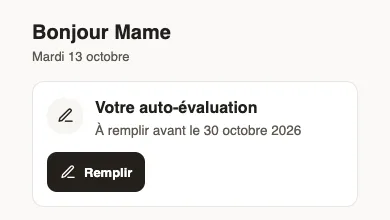
In Weplanify, the employee answers the questions of their review before their manager does, from the card on their home page, on a computer or a phone.
In Weplanify, when a campaign includes the self-assessment, the employee gets the Your self-assessment notification and a card on their home page. Their manager will read their answers before filling in their evaluation.
Steps
- On the home page, click Fill in in the Your self-assessment card, or open the notification.
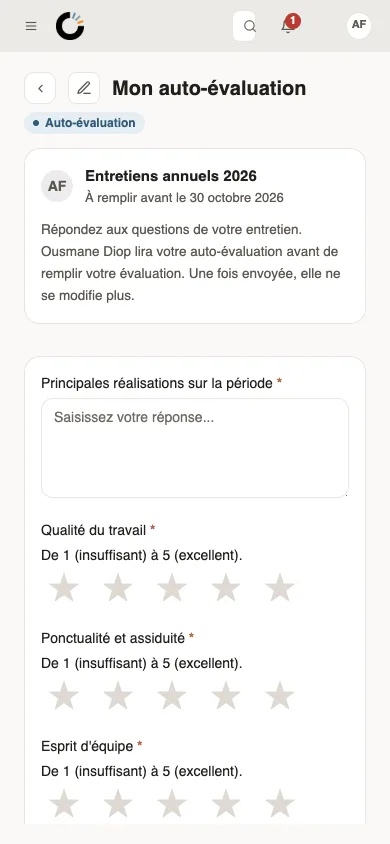
- The My self-assessment page recalls the campaign, the deadline and who will read your answers, with your previous objectives if any.
- Answer the questions: a click on the stars gives the rating out of 5; questions marked with an asterisk are required.
- Click Submit: your manager is told and can evaluate you.
Good to know
- Once sent, the self-assessment can no longer be changed.
- Questions kept for your manager are not asked to you.
- You are reminded 7 days and 2 days before the deadline. The day after, your evaluation goes to your manager, even without your answer.
- Later, you read your evaluation with your answers and your manager's side by side (read and sign your evaluation).
Go further
Read and sign your evaluationIn Weplanify, the employee reads their evaluation, adds a comment if they wish, then signs it online, from a computer or from their phone browser.Offer a self-assessment before the reviewIn Weplanify, each employee can first answer their own questionnaire; their manager then sees those answers next to each question of the grid.