
Have an evaluation signed on paper
In Weplanify, for an employee without an account, print the evaluation, have it signed, then attach the signed copy: it joins their documents.
In Weplanify, an employee without an account cannot sign online. The panel of their evaluation says so as soon as it is to sign, and offers to go through paper.
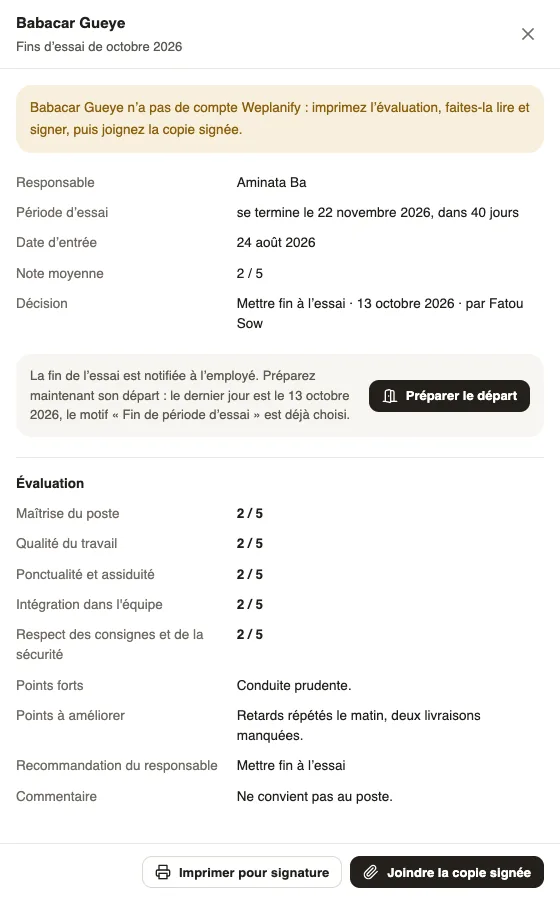
Steps
- In the campaign's Follow-up, filter on To sign and open the evaluation.
- Click Print for signature: the PDF of the evaluation downloads, with an Acknowledgement page for the employee's comment and signature.
- Print it, have the employee read and sign it.
- Click Attach the signed copy and choose the scan or the photo (PDF, JPG or PNG, 15 MB at most).
- The copy joins the employee's documents and the evaluation becomes Signed.
Good to know
- Both buttons also work for an employee who has an account, when the evaluation is to sign or not signed (declined signature).
- When filling in the evaluation, the manager is told that HR will print it.
- In the employee's documents, the copy is marked "signed on paper". See the signed copy, in the panel, opens it.
- For the employee to sign online, invite them to Weplanify from their record (the employee record).
Go further
When an employee declines to sign their evaluationIn Weplanify, an employee can decline to sign and give a reason; after talking it over, HR asks for the signature again or switches to paper.The employee recordIn Weplanify, the employee record brings together everything about a person in its tabs, with sections that you edit one at a time, separately.Review an evaluation and send it to the employeeIn Weplanify, when the HR review is turned on, each filled-in evaluation waits for your approval before it is sent to the employee it is about.