
When an employee declines to sign their evaluation
In Weplanify, an employee can decline to sign and give a reason; after talking it over, HR asks for the signature again or switches to paper.
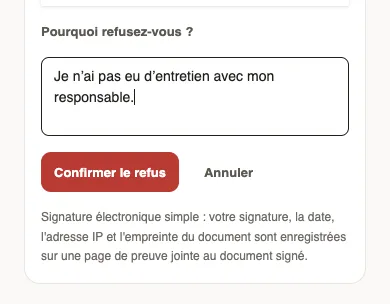
In Weplanify, signing an evaluation means having read it, not agreeing. An employee can still decline: they write why, and HR gets the Evaluation not signed notification.
Steps
- On the employee side: under the document, Decline to sign, then the reason under Why do you decline? and Confirm.
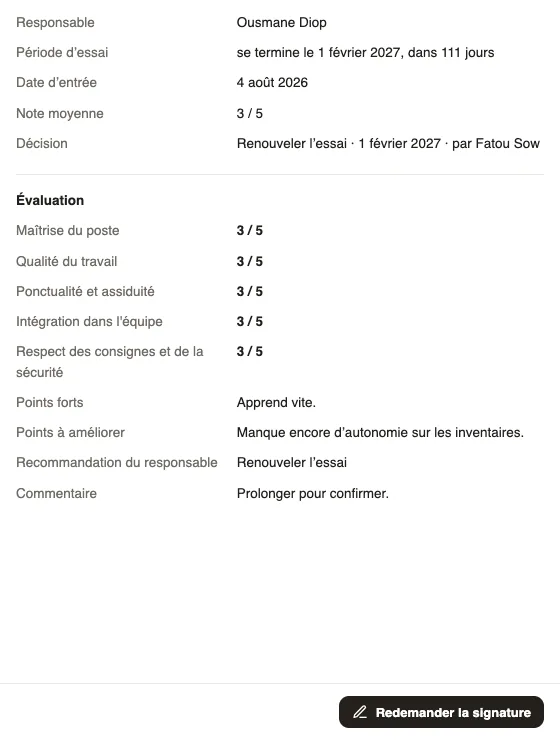
- On the HR side: open the evaluation from the notification or the Not signed filter of the Follow-up; the panel shows the reason.
- Talk it over with the employee.
- Click Ask to sign again and confirm: the evaluation goes back to To sign and the employee is asked to sign it, with a new comment if they wish.
- You can also have it signed on paper (paper signature).
Good to know
- The refusal stays in the document history.
- An evaluation left to sign without an answer: the employee is reminded after 3 days, then HR is told after 7 days.
- What the employee sees: read and sign your evaluation.
Go further
Have an evaluation signed on paperIn Weplanify, for an employee without an account, print the evaluation, have it signed, then attach the signed copy: it joins their documents.Read and sign your evaluationIn Weplanify, the employee reads their evaluation, adds a comment if they wish, then signs it online, from a computer or from their phone browser.Follow a campaign and remind managersIn Weplanify, the Follow-up tab of a campaign shows each manager’s progress, late ones and signatures, reminds in one click and exports to Excel.